

What Impact tells you
What counts as useful depends on what the workflow does. Overcut works out the workflow’s type from what its runs create, and leads with the measure that matters for that type:
If the detected type is wrong, change it with Measured as: at the top of the section, or pick Detected: type to go back to automatic detection. You need permission to edit the workflow. The type only changes what the section leads with. Every output is still measured.
Code review
A comment also counts as addressed when the concern went away through a different change, for example the code was rewritten or a test now covers it. Results come in as pull requests merge.
Declined comments lists each declined comment with the person’s reply and a link to the thread. It’s the fastest way to see what the review keeps getting wrong. Turn the pattern into an instruction change, or into a memory the reviewer uses next time.
PR builder
A pull request still open after 30 days counts as stale. If it merges later, it counts as merged.
Triage
The breakdown also shows changes a person reverted and tickets a person reopened after the workflow closed them. Only people’s changes count. Changes by other bots don’t.
Ticket analysis
Overcut reads people’s replies on the ticket to tell whether they confirmed the cause, rejected it, or didn’t say. A fix counts when a pull request linked to the ticket merges, including through the ticket key in its title or branch name.
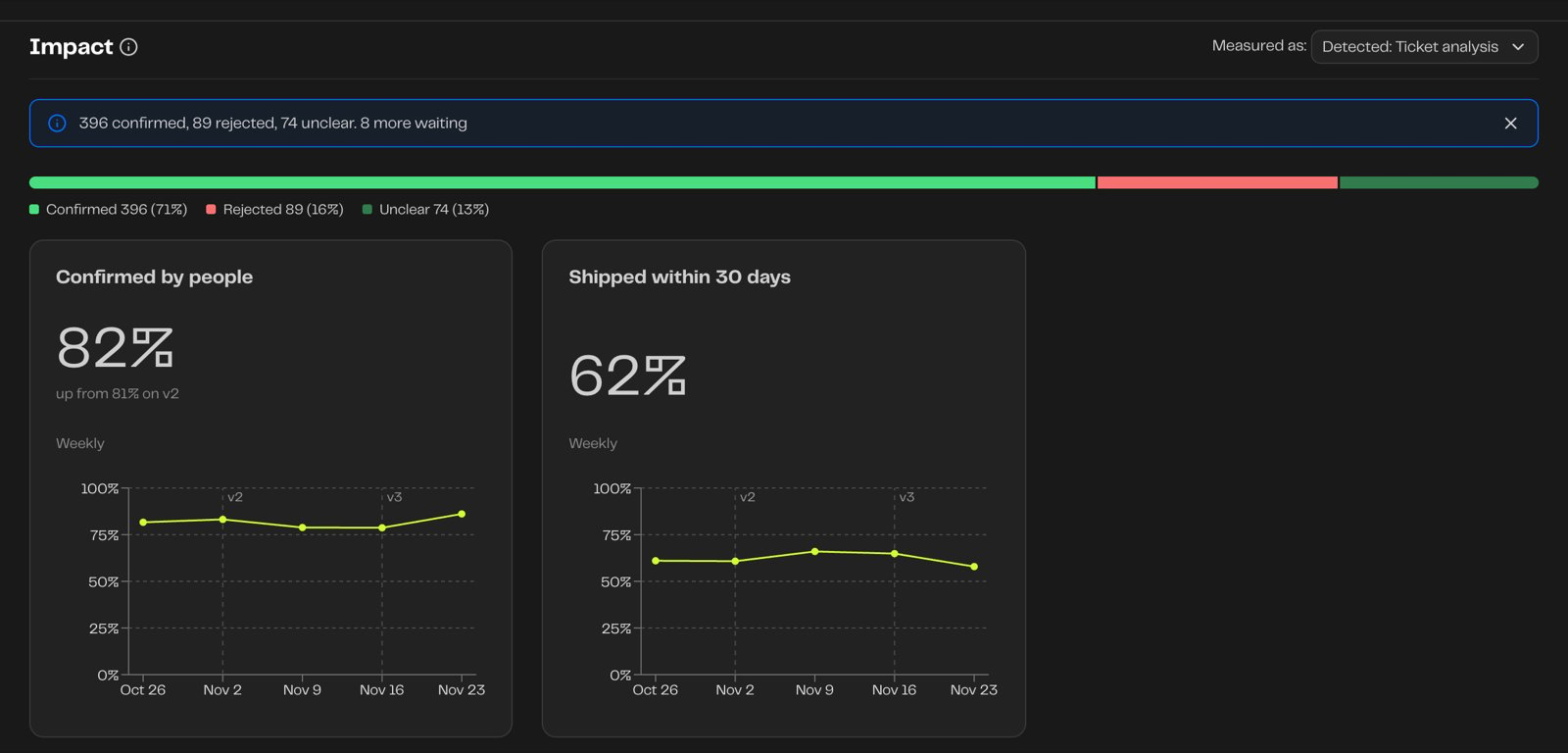
Impact for a ticket analysis workflow.
From trigger to impact
The funnel shows where runs drop off: how many were Triggered, Completed, produced an output (for example Posted a review), and had that output used (for example At least one comment acted on). A big drop at the last stage means the workflow runs fine but its work isn’t landing.
From trigger to impact: 70% of analyses were confirmed or led to a fix.
Why some results are missing or waiting
Most outcomes take time. A review comment is judged when its pull request merges, a ticket change after 14 days, and a fix can take up to 30 days to ship. Until then, the section shows what’s waiting, such as 1 PR open or 2 tickets in review. Keep these in mind when you read the numbers:- Recent periods look incomplete. Outcomes count on the day they happen, for example the merge, not the day of the run. Many of last week’s outcomes may still be on the way.
- Impact starts when it’s turned on. Runs from before then have no Impact results. When a period includes them, you see a notice such as “9 of 107 runs measured.”
- Missing doesn’t mean bad. A run with no result may predate measurement, still be waiting, or not be measurable. A run’s Outcome says which.
- Small numbers move a lot. Wait for at least a handful of results before acting on a change.
Where else you see Impact
- Status and Versions on the Improve tab show the main Impact rate per version, so you can tell whether a change helped.
- Run lists have an Outcome column, such as “Merged - 3 of 4 addressed”.
- A run’s Results has an Outcome section that says what happened to each of its outputs.
- Select Explore on a card to discuss the numbers with the assistant, or ask in chat, for example “Why are review comments being declined?”
Supported tools
Pull request outcomes work with GitHub, GitLab, Azure DevOps, Bitbucket Cloud and Bitbucket Server. Ticket outcomes work with GitHub Issues, GitLab issues, Azure DevOps work items, Bitbucket Cloud issues and Jira.Usage
Reading comments and replies uses the LLM model set on Measure & Improve, or the workspace default model. These tokens are recorded on the workflow and count toward workspace usage limits.Related
- Workflow Improve Tab: Impact next to score, tokens and success rate
- Online Evaluation: score the quality of each run
- Self Improvements: learn from recent runs