The Repository Selector is a powerful filtering mechanism that tells Overcut which Git repositories or projects a scheduled workflow should operate on.
The repository selector can be used to select both code repositories and ticket projects/ repositories.
See the Scheduled Workflows guide for an end-to-end walkthrough of cron triggers and execution modes.
Field Reference
| Field | Type | Description |
| Name Pattern | String (regex) | Regular expression to match against the full repository name (e.g., myorg/my-repo). For example, ^myorg/backend-.* matches all repos in myorg starting with backend-. Leave empty to match all repositories. |
| Exclude Pattern | String (regex) | Regular expression to exclude repositories by full name. For example, ^.*-archived$ excludes repos ending with -archived. Exclusions run after inclusions. |
| Provider | String | Filter by a specific Git provider. Options: Github, Gitlab, Bitbucket, AzureDevOps, Jira. Leave empty to match any provider. |
| Use For Code | Boolean | If ON, only repositories marked Use for Code in Repository Settings are considered. |
| Use For Tickets | Boolean | If ON, only repositories marked Use for Tickets are considered. Useful for selecting ticket projects (Jira, GitHub Issues). |
Overcut applies an upper bound of 100 repositories per evaluation to protect your workspace from accidental fan-out. If your selector matches more than 100 repos, only the first 100 (sorted alphabetically) will be used and a warning appears in the UI and execution logs.
Authoring Selectors in the UI
- Open Workflow Builder and add/edit a Trigger or Action that supports selectors (e.g., a Scheduled trigger in Per-Repository mode).
- In the Repository Selector panel, fill in the fields described above.\
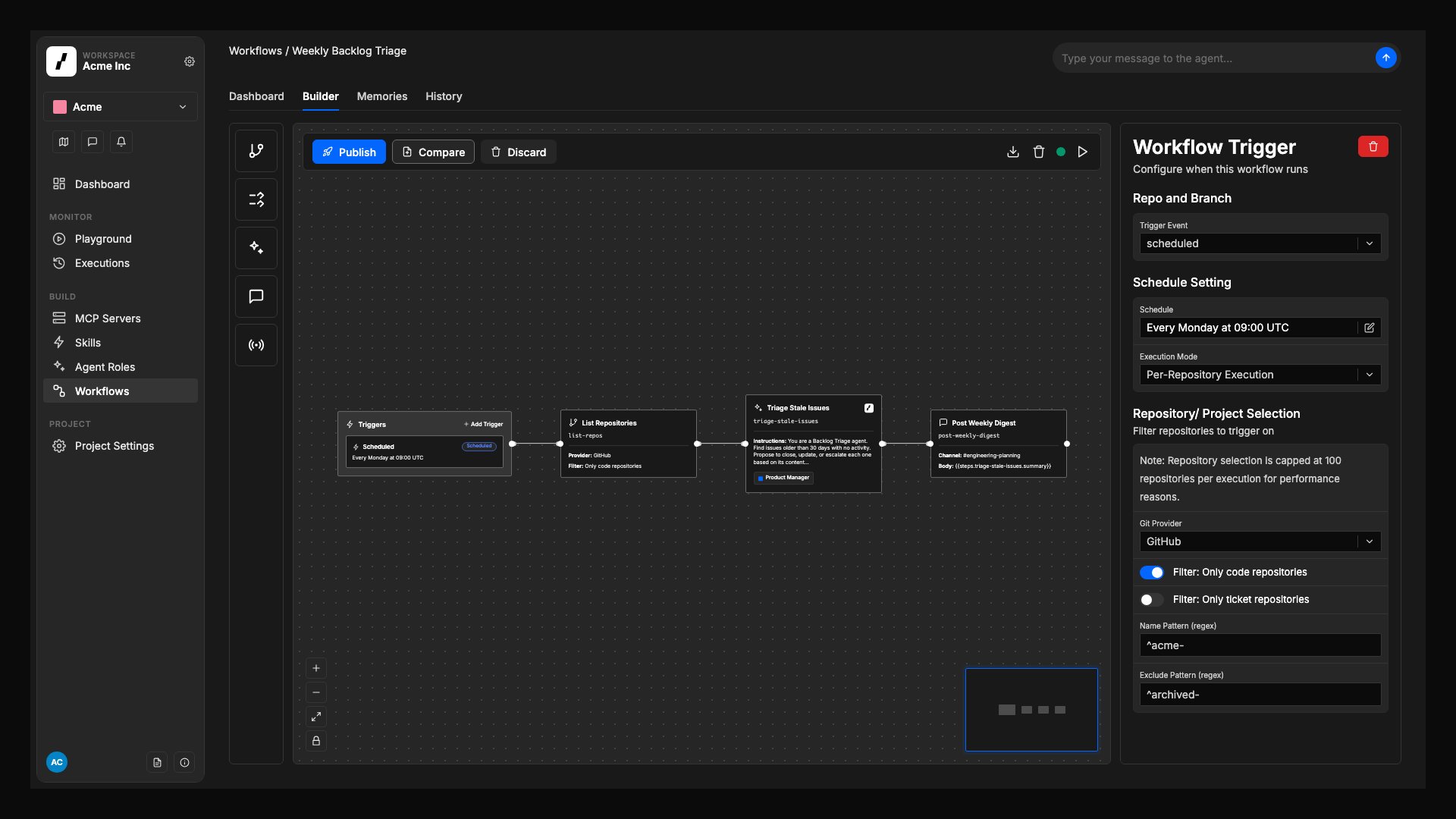
- Click Save. The selector definition is now embedded in the workflow version and will be evaluated at runtime.
namePattern matches the full repository name including the organization (e.g., acme/web-app)
Use regex alternation (pattern1|pattern2) to match multiple patterns
Real-World Selector Examples
| Goal | Example Selector |
| Run on all GitHub repos in acme org | provider: Github, namePattern: ^acme/.*, useForCode: true |
Run on repos starting with infra- in any org | namePattern: "/infra-" |
| Skip archived or deprecated repos | excludePattern: (-archive|-deprecated)$ |
| Operate on ticket projects only (Jira & GitHub Issues) | useForTickets: true |
| Multiple orgs: match repos in acme or beta orgs | namePattern: ^(acme|beta)/.* |
| Complex pattern: backend or API repos, excluding test repos | namePattern: /(backend|api)-, excludePattern: -test$ |
Best Practices & Gotchas
- Patterns Match Full Names – Remember that
namePattern and excludePattern match against the full repository name (e.g., myorg/my-repo), not just the repo name. To filter by organization, use ^orgname/ in your pattern.
- Use Regex Alternation for Multiple Patterns – To match multiple patterns, use regex alternation syntax:
^(pattern1|pattern2|pattern3). For example: ^acme/(web-.*|api-.*) matches repos in the acme org starting with web- or api-.
- Start Narrow, Then Broaden – Begin with tight patterns, verify run counts, then relax filters if needed.
- Avoid Overly Broad Selectors – Matching every repo can create hundreds of workflow runs. Use specific patterns and purpose flags to limit scope.
- Monitor Execution Volume – Check Execution History after enabling a new schedule to confirm expected run counts.
- Combine with Repository Mapping – For ticket-triggered workflows, prefer Repository Mapping and
repo.identify over broad selectors.
Further Reading