

Overview
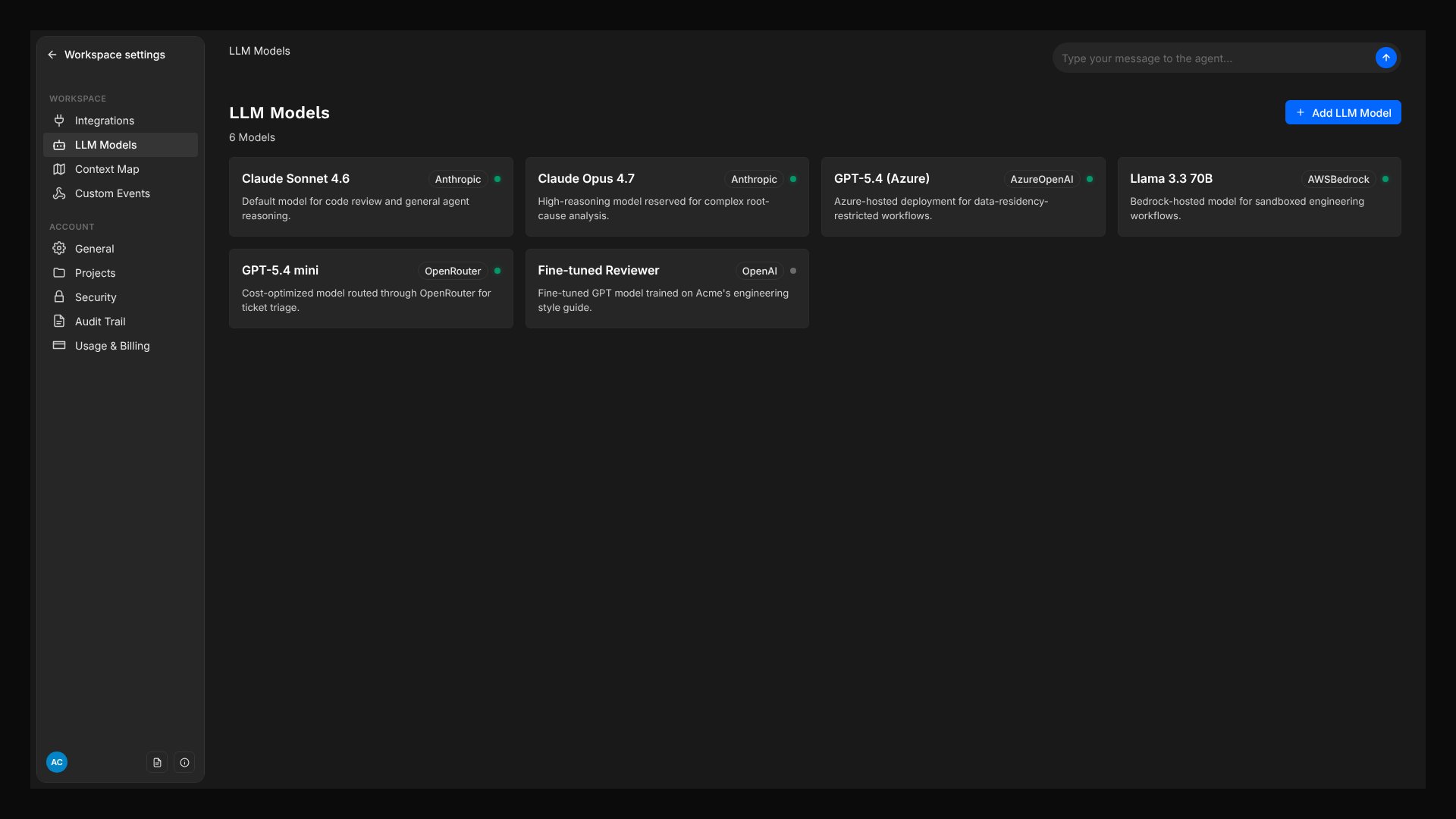
Bring Your Own Key
Connect your existing API keys from OpenAI, Anthropic, Azure, AWS Bedrock, or OpenRouter.
Per-Agent Control
Assign a specific model to each agent: use a fast model for triage and a powerful model for code review.
Cascade Defaults
Set defaults at the workspace, workflow, or agent level. Agents inherit the closest configured default automatically.
Encrypted Storage
API keys are encrypted at rest and never exposed in the UI, logs, or to the LLM itself.
Supported Providers
Creating a Custom Model
Open LLM Models
Navigate to LLM Models in the main menu.
Create a new model
Click the Add LLM Model button. Enter a model name (e.g. “Claude Sonnet for Production”) and select a provider.
Configure the provider
Fill in the provider-specific configuration. Each provider requires different fields. For gateway-backed providers, configure endpoint, auth, and header settings only when your gateway requires them. See the Provider Configuration section below.
Test the model
Click Test Model next to Save Changes. Overcut checks the connection and detects what the model supports. See Testing a Model.
Save
Click Save Changes. Overcut encrypts your API key or token and stores the model together with its test result. It is now available for assignment.
Once a model is created, the provider and model key cannot be changed. To switch providers, create a new model and reassign your agents. Use Edit Config on the model page to change credentials, endpoints, or the model ID within the same provider.
Testing a Model
Testing a model confirms that Overcut can reach it with your credentials and detects what it supports, so runs use the right features from the start. Click Test Model next to Save Changes when you create a model or edit its configuration, or on the page of any saved custom model. The test checks the connection first, then four capabilities:- Tool calling: Whether agents can use tools during a run.
- Vision: Whether images can be sent to the model.
- Native PDF: Whether PDF attachments can be sent as documents, or should be converted to text first.
- Prompt caching: Whether the provider can reuse the shared prefix of each request. See Prompt caching.
You can save a model without testing it. Overcut then falls back to assumptions based on the provider, the model name, and the Supports Vision setting. Testing replaces those assumptions with verified results.
Vision support
Until a model passes a test, the model page shows a Supports Vision toggle. It is off by default. Turn it on only when both the model and its configured endpoint accept images. After a successful test, the detected Vision result replaces the toggle.Prompt caching
Overcut handles prompt caching for you. The shared prefix of each request (tools and system prompt) is reused across turns, which lowers latency and cost. OpenAI and Azure OpenAI cache automatically on their side and need nothing from Overcut. Anthropic and AWS Bedrock require an explicit cache checkpoint in the request, and Overcut adds it automatically for Claude models on Anthropic, OpenRouter, and AWS Bedrock. Testing the model confirms that caching works with your configuration. A Supported result shows the verified method (Anthropic cache breakpoints or Bedrock Converse cache points), and Overcut uses that method for every run. For OpenAI and Azure OpenAI, the result is Not supported because no checkpoint is needed.Provider Configuration
OpenAI
required
Your OpenAI API key.
required
The model identifier (e.g.
gpt-4.1, gpt-4o, o3).Optional. Overrides the API endpoint for proxies, gateways, or OpenAI-compatible endpoints.
Azure OpenAI
required
Your Azure OpenAI resource key.
required
The Azure OpenAI resource URL (e.g.
https://your-resource.openai.azure.com).required
The name of the deployed model in your Azure resource.
required
The Azure OpenAI API version (e.g.
2024-02-15-preview).Azure OpenAI (Responses API)
required
Your Azure OpenAI key or the gateway token your endpoint expects.
required
The model deployment name to use.
required
Your Azure OpenAI resource endpoint with the
/openai path (e.g. https://your-resource.cognitiveservices.azure.com/openai).required
The API version (e.g.
2025-04-01-preview).Choose Yes to use the Responses API format, or No when your endpoint expects the non-Responses format.
Anthropic
Your Anthropic API key from
console.anthropic.com. Use this or a Claude Subscription Token, not both.A token generated by running
claude setup-token. Usage is billed against your Claude subscription, and available models depend on your plan. Use this or an API Key, not both.Optional. The URL of an Anthropic-compatible gateway. The gateway must support the Anthropic
/v1/messages API. OpenAI-compatible endpoints do not work.required
The Claude model ID (for example,
claude-sonnet-4-5-20250929) or an alias such as sonnet, opus, or haiku.Optional. A model to use when the primary model is unavailable.
An Anthropic model configured with only a Claude Subscription Token works with the Claude engine. The Overcut engine requires an Anthropic API Key.
AWS Bedrock
A Bedrock API key generated in the AWS console. When you provide this key, you can leave both IAM credential fields empty.
Your AWS access key ID. Not needed when a Bedrock API Key is set; required together with Secret Access Key when using IAM credentials.
Your AWS secret access key. Not needed when a Bedrock API Key is set; required together with Access Key ID when using IAM credentials.
required
The AWS region where your Bedrock models are available (e.g.
us-east-1).required
The Bedrock model ID or inference-profile ID (e.g.
anthropic.claude-3-sonnet-20240229-v1:0).Provide either a Bedrock API Key or a complete Access Key ID and Secret Access Key pair. The Bedrock API Key takes precedence when both methods are populated. Validation fails if you provide only one IAM field or neither authentication method.
OpenRouter
required
Your OpenRouter API key.
required
The OpenRouter model identifier, in
provider/model format (e.g. anthropic/claude-sonnet-4, openai/gpt-4.1).Optional. Overrides the default OpenRouter endpoint when you use a compatible gateway.
Gateway and Custom Endpoint Settings
Gateway settings appear only for providers that support OpenAI-compatible endpoints or static gateway headers. Use them when your provider traffic must pass through a proxy, API gateway, Azure API Management, or another OpenAI-compatible endpoint.Auth method choices
For OpenAI, OpenRouter, and Azure OpenAI (Responses API), choose the Auth method that matches your endpoint or gateway:- Bearer token (Authorization header): Sends the credential in the Authorization bearer header. This is the default choice for OpenAI-compatible endpoints.
- api-key header: Sends the credential in the
api-keyheader. Use this when Azure OpenAI or your gateway expects anapi-keyheader. - Custom header: Sends the credential under the header you enter in Custom auth header name.
x-api-key. Overcut requires this field when Auth method is Custom header.
Extra headers (JSON)
Use Extra headers (JSON) for static headers that should be sent with every request to the endpoint. The value must be a JSON object. Header names and header values must both be strings.Assigning Models
Per-Agent
Each agent has a model selector in its settings. Choose a specific model or leave it on Default Model to inherit from the workflow or workspace.Open the agent
Navigate to Agent Roles and select an agent.
Select a model
Use the Model dropdown to pick a custom model or Default Model.
Per-Workflow
Set a workflow-level default in the Workflow Builder so all agents in that workflow inherit the same model unless they have their own override.Open Workflow Settings
Click the canvas background to open Workflow Settings.
Set Default LLM Model
Select a model from the Default LLM Model dropdown.
Per-Workspace
Set a workspace-wide default in Account → Settings. All workflows and agents that don’t specify their own model will use this default.Inactive Models
Set a model to inactive when you want to stop it from being selected without losing its configuration. Inactive models remain visible in LLM Models so you can review them, edit their details, or reactivate them: open the model and use the Inactive control to switch it back to Active. Inactive models are hidden anywhere a model is selected: agent Model dropdowns, workflow Default LLM Model dropdowns, and the workspace default model picker.Model Cascade
Model resolution depends on the execution engine. Both engines use the first configured value in their cascade, but the Claude engine has its own workspace default and eligibility requirements.Overcut engine cascade
- Coordinator override: The model selected for the coordinator in an Agent Session step. This override applies only to the coordinator, not its sub-agents.
- Agent model: The agent’s own model selection.
- Workflow default: The Default LLM Model set in Workflow Settings.
- Workspace default: The Default LLM Model set in Account → Settings.
- System default: Overcut’s managed default model.
Claude engine cascade
- Coordinator override: The model selected for the coordinator in an Agent Session step.
- Agent model: The agent’s own model selection.
- Workflow default: The Default LLM Model set in Workflow Settings.
- Workspace Claude default: The Default Claude Engine Model set in Account → Settings.
- Main workspace default: The Default LLM Model set in Account → Settings.
For a step-by-step walkthrough of configuring defaults at each level, see the Default Model Configuration guide.
Overcut vs. Claude
Overcut supports two execution engines. In the Workflow Builder, use Execution Engine to select Overcut or Claude for an agent step. This section covers model eligibility only. For what else changes between engines (tools, sub-agents, recovery, usage reporting), see Execution Engines.Overcut
The default engine supports every provider listed on this page.- Model selection: Uses agent, workflow, and workspace model settings, with a system model available as the final fallback.
- Providers: OpenAI, Azure OpenAI, Anthropic, AWS Bedrock, and OpenRouter.
- Credentials and billing: Custom models use your provider credentials and billing. System models use Overcut billing.
Claude
The Claude engine runs the Claude Agent SDK with credentials from a compatible custom LLM Model.- Eligible models: The resolved model must be active, owned by the current workspace, non-system, and provided by Anthropic or AWS Bedrock.
- Model selection: Uses the Claude-specific cascade above, including the separate Default Claude Engine Model. The first resolved candidate must be eligible.
- Credentials and billing: Usage goes through the Anthropic or AWS credentials saved on the selected model.
- No system fallback: The Claude engine cannot use system models. If the cascade does not resolve an eligible custom model, the step fails and you must select or configure one.
Provider compatibility differs by engine. OpenAI, Azure OpenAI, and OpenRouter models can run with the Overcut engine, but not the Claude engine. An Anthropic model that uses only a Claude Subscription Token can run only with the Claude engine.
Security
- API keys are encrypted at rest and never returned through the UI or API.
- Decrypting a model’s configuration requires the
llmModel.readEncryptedConfigpermission. - System models (managed by Overcut) cannot be edited or deleted by workspace users.
Next Steps
- Default Model Configuration: Step-by-step guide for setting workspace, workflow, and coordinator defaults
- Claude Agent SDK Integration: Detailed setup guide for the Claude Code engine
- Vault: Manage secrets used across your workspace
- Core Building Blocks: Understand how agents, actions, and triggers connect