

Overview
Audit Trail is the system of record for change in your workspace. Every time someone creates, updates, or removes a resource, Overcut writes an event that captures who did it, what they did, which resource was affected, and when. That history gives security and compliance teams the accountability they need: a verifiable answer to “who changed this, and when,” without depending on anyone’s memory or on the resource itself still existing. Use Audit Trail to investigate a configuration change, reconstruct the sequence of events around an incident, confirm that a sensitive value was rotated, or produce evidence for an access review or compliance audit.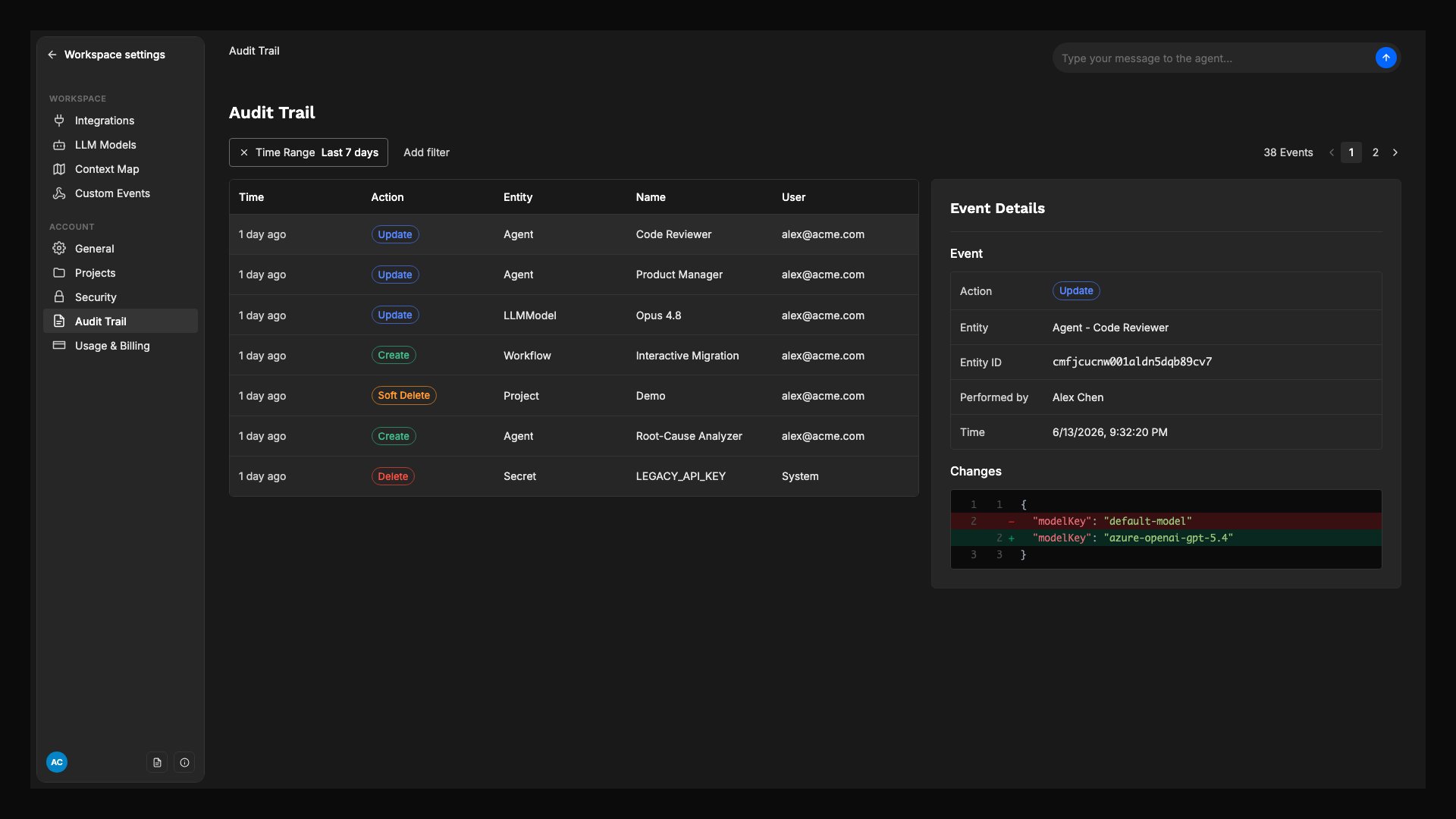
The Audit Trail page: a filterable history of changes, with the Event Details panel showing a field-level before and after diff for the selected event.
Access
Viewing Audit Trail is restricted to roles responsible for security, compliance, and operational review, so workspace activity stays visible only to the people accountable for it. If you do not see Audit Trail in the workspace, ask a workspace administrator to confirm your role includes permission to view audit logs.What gets recorded
Each event captures a single change to a single resource. The fields below are what you review and filter on:
The before and after comparison is a summary of which fields changed, not a full copy of the resource. Treat it as evidence that a change happened and what it affected, rather than a backup you can restore from.
How sensitive values are protected
When a change touches a secret or other protected field, Overcut redacts the value before the event is ever written. The event still records that the field changed, who changed it, and when, but the value itself never enters the audit log. This applies to resources like project secrets, API tokens, and credentials. The event names which fields were redacted, so you can see exactly what changed while the values themselves stay out of the log. Audit Trail confirms that a protected value was added, changed, or removed. It is not a way to read or recover the value.To validate, rotate, or replace a secret, use the resource’s own settings (for example, the project Vault). Audit Trail is for confirming the change occurred, not for retrieving the value.
Filter the history
Events are shown newest first, scoped to the last 7 days by default. Widen or remove the time range to review older activity. Combine filters to narrow a large history down to the change you are investigating:- Action: isolate creates, updates, deletions, or restores.
- Entity type: focus on one category of resource, such as users, repositories, or secrets.
- Actor: see everything a specific user did.
- Project: limit results to a single project’s activity.
- Time range: Last 24 hours, Last 7 days, Last 30 days, or All time.
What activity is covered
Audit Trail records change across the resources teams configure and operate, including:- Workspaces and projects: workspace and project settings and configuration.
- People and access: users, teams, roles, permissions, and invitations.
- Source control: connected repositories and Git organizations.
- Automation: workflows, agents, skills, MCP servers, and channels.
- Sensitive configuration: API tokens, project and Library secrets, LLM model credentials, and Custom Events.
- Context parameters: definitions and the values set on each scope. Values are plain text by design, so the value itself is recorded, unlike a secret.
Related references
- Privacy and Security: how Overcut protects workspace data and secrets.
- Vault: manage the secrets used by workflows, agents, and MCP servers.
- Context Parameters: the plain-text values whose changes are recorded in full.
- Workspace Settings: configure workspace-level profile, defaults, and credentials.