

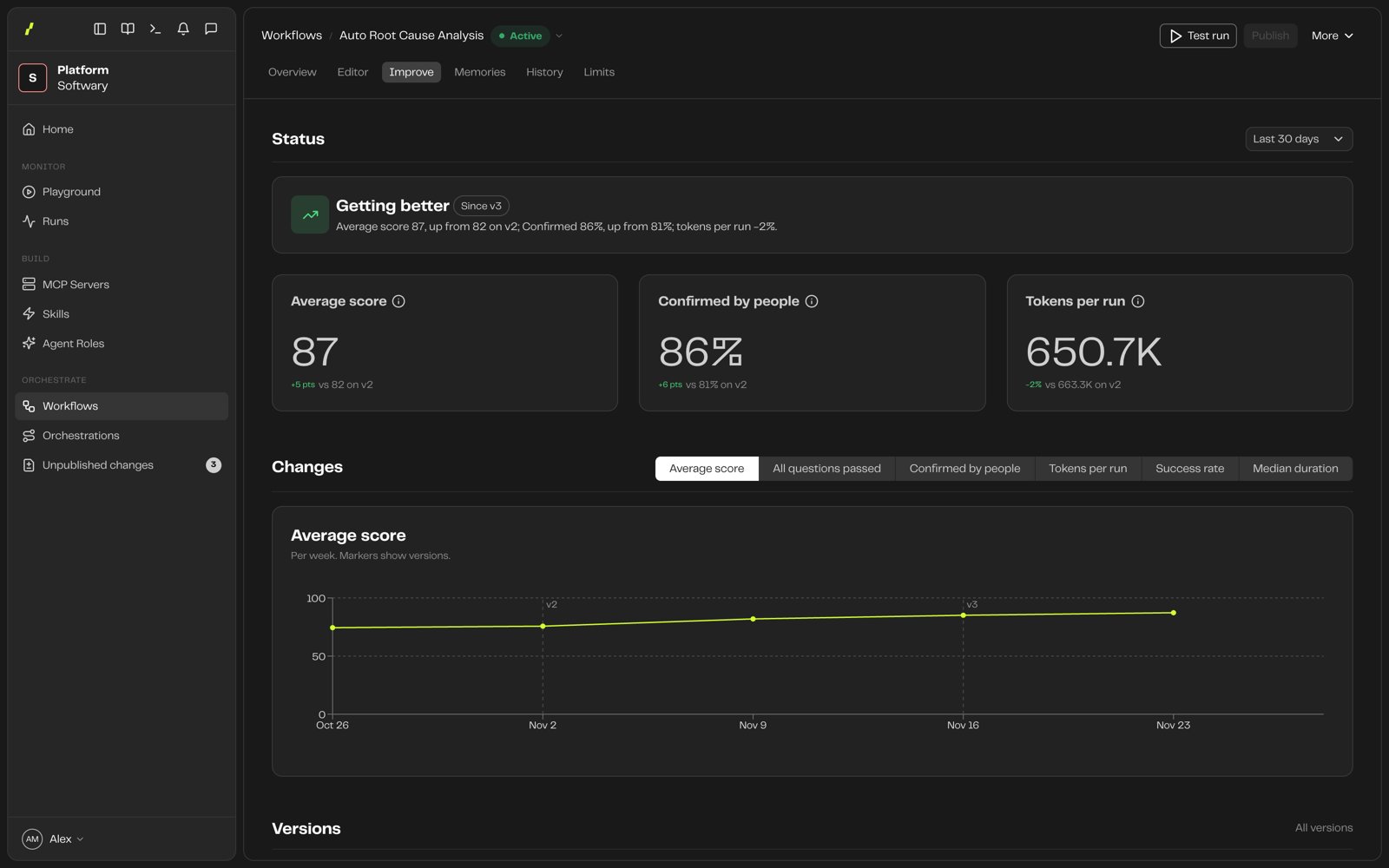
A workflow's Improve tab: the newest version scores higher and more of its analyses are confirmed.
Why it exists
A run that completes is not the same as a run that helped. A code review workflow can finish every run and still post comments that nobody acts on. A PR builder can open pull requests that are closed or reverted. Run status alone can’t tell these apart. Continuous Intelligence answers three questions for every workflow:
At the project level, Project Impact adds team delivery metrics, such as pull request cycle time and merge rate, so you can see how Overcut fits into the way your team ships.
Self Improvements closes the loop. It learns from recent runs, saves workflow memories that later runs use, and tells you what needs fixing.
What you can do with it
- Prove value. Show how many review comments authors act on, how many Overcut pull requests merge, and how your team’s cycle time changes.
- Find the weak workflows. See which workflows run fine but produce work nobody uses.
- Ship changes with confidence. Publish a new version and see whether it scores better, gets used more, or costs fewer tokens. Roll back if it doesn’t.
- Fix the right thing. Go from a number straight to the examples behind it: low-scoring runs, declined review comments, and fixes Self improvements suggest.
- Let workflows learn. Self improvements turn lessons from past runs into memories agents use next time.
How it fits together
Your workflows run as usual
Nothing changes in how workflows run. Overcut keeps track of what each run produced.
Overcut follows what happens next
It sees whether review comments are acted on, pull requests merge and last, ticket changes are kept, and analyses are confirmed.
Runs are checked for quality
If you define what a good result looks like, Overcut scores a sample of runs against it.
Versions are compared
The workflow Improve tab shows each published version side by side, so you see whether a change helped.
The workflow learns
Self improvements turn recent runs into lessons for the next ones.
What lives where
Two sections are titled Impact. The one on the project Home page measures team delivery across repositories. The one on a workflow’s Improve tab measures the outcomes of that workflow’s own outputs. This documentation calls them Project Impact and Workflow Impact.
Ask the assistant
The Overcut assistant and the Overcut MCP server can read the same data. You can ask questions such as:- “Is the review workflow’s feedback being used?”
- “Did v5 of this workflow do better than v4?”
- “Show the review comments people declined this month and suggest instruction changes.”
- “How long do our pull requests wait for a first review, by repository?”
- “Draft evaluation questions for this workflow and test them on recent runs.”
Related
- Set Up Continuous Intelligence: turn it on, choose the model and start collecting repository data
- Workflow Improve Tab: read status, changes and version comparisons for one workflow
- Workflow Impact: how outcomes are measured for each kind of workflow
- Online Evaluation: write evaluation questions and read run scores
- Project Impact: delivery metrics for a project’s repositories
- Self Improvements: how workflows learn from recent runs