

Comparison
Senior Developer
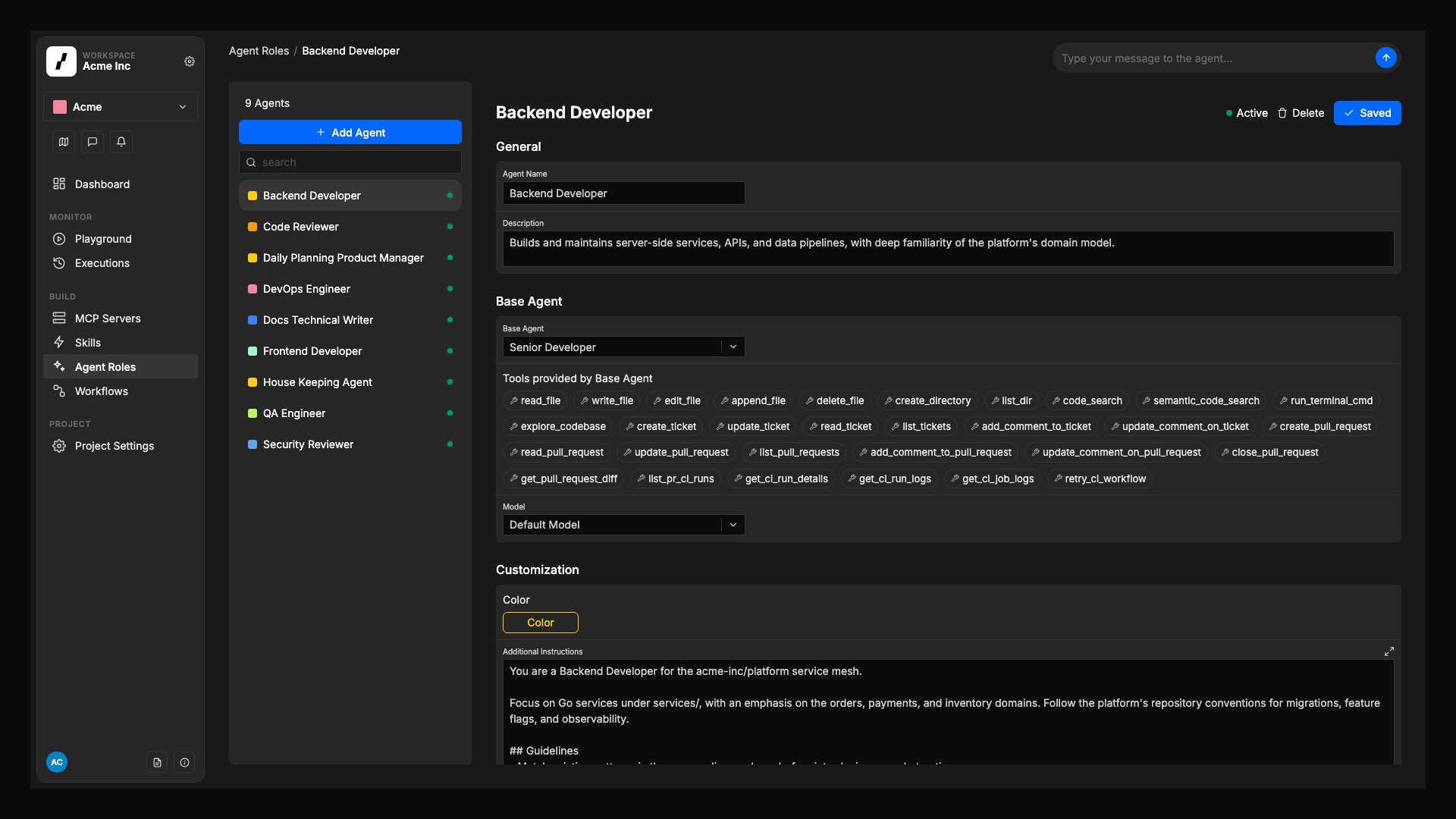
A full-stack engineering agent with the broadest default toolset. It can read and write code, run terminal commands, manage tickets, open and close pull requests, and monitor CI pipelines. Best for: Feature implementation, bug fixes, refactoring, debugging, and any task that requires making changes to the codebase.Default tools
File System: Read File, Write File, Edit File, Append File, Delete File, Create Directory, List Directory Code Utilities: Search Code, Semantic Code Search, Execute Terminal Commands, Explore Codebase Tickets and Issues: Create Ticket, Update Ticket, Read Ticket, List Tickets, Add Comment to Ticket, Update Comment on Ticket Pull Requests: Create Pull Request, Read Pull Request, Update Pull Request, List Pull Requests, Add Comment to Pull Request, Update Comment on Pull Request, Close Pull Request, Get Pull Request Diff CI/CD: List PR CI Runs, Get CI Run Details, Get CI Run Logs, Get CI Job Logs, Retry CI Workflow See the full tool descriptions for details on each tool.Tech Writer
A writing-focused agent with full file access and the ability to create and update tickets and pull requests. Designed for agents that produce or maintain documentation, specs, or structured content. Best for: Writing and updating documentation, drafting specs from tickets, generating changelogs, and any task that primarily involves producing text content in the repository.Default tools
File System: Read File, Write File, Edit File, Append File, Delete File, Create Directory, List Directory Code Utilities: Search Code, Semantic Code Search, Execute Terminal Commands, Explore Codebase Tickets and Issues: Create Ticket, Update Ticket, Read Ticket, List Tickets, Add Comment to Ticket, Update Comment on Ticket Pull Requests: Create Pull Request, Read Pull Request, Update Pull Request, List Pull Requests, Add Comment to Pull Request, Update Comment on Pull Request, Close Pull Request, Get Pull Request Diff See the full tool descriptions for details on each tool.Code Reviewer
A read-focused agent built specifically for pull request reviews. It can read (but not write) files, analyze code changes, add inline review comments, and monitor CI runs, but cannot create or merge PRs, or update ticket fields. Best for: PR code reviews, automated quality checks, security analysis, and any task that should inspect code without making changes.Default tools
File System: Read File, Append File, List Directory Code Utilities: Search Code, Semantic Code Search, Execute Terminal Commands, Explore Codebase Tickets and Issues: Read Ticket, List Tickets, Add Comment to Ticket, Update Comment on Ticket Pull Requests: Read Pull Request, Update Pull Request, List Pull Requests, Add Comment to Pull Request, Update Comment on Pull Request, Get Pull Request Diff Code Review: Add Review Comment, Reply to Review Comment, Submit Review CI/CD: List PR CI Runs, Get CI Run Details, Get CI Run Logs, Get CI Job Logs See the full tool descriptions for details on each tool.Product Manager
A planning and coordination agent focused on tickets and pull request oversight. It can read files and code, but cannot write to the repository directly. It manages the full ticket lifecycle and can comment on pull requests. Best for: Issue triage, sprint planning, ticket creation from PRs or incidents, dependency analysis, and any workflow that coordinates work without touching code directly.Default tools
File System: Read File, List Directory Code Utilities: Search Code, Semantic Code Search, Execute Terminal Commands, Explore Codebase Tickets and Issues: Create Ticket, Update Ticket, Read Ticket, List Tickets, Add Comment to Ticket, Update Comment on Ticket Pull Requests: Read Pull Request, Update Pull Request, List Pull Requests, Add Comment to Pull Request, Update Comment on Pull Request, Get Pull Request Diff See the full tool descriptions for details on each tool.Custom
The Custom base type starts with no default tools and no role-specific instructions. It includes only the general agent harness (the base operational framework shared by all agents), with no persona, no process guidelines, and no assumptions about what the agent should do. This makes Custom well-suited for focused, specific tasks where you want full control over the agent’s behavior. Because there are no pre-configured role instructions, there’s no risk of them conflicting with your own instructions. Best for: Specific, narrowly-scoped tasks where you want to provide all instructions yourself without interference from role defaults. Examples include a dedicated security auditor, a changelog generator with restricted write access, or a triage-only agent that should never touch code.Configuring a Custom agent
1
Select Custom as the base type
In Agent Roles → Add Agent, choose Custom from the base agent type selector.
2
Add tools that match the agent's purpose
From the tool selection list, pick only the tools this agent needs. See the Agent Tools Reference for descriptions of each tool and which category it belongs to.
3
Write domain instructions
Unlike other base types, Custom has no pre-configured role instructions. Use the Additional Instructions field to fully define the agent’s role, behavior, and constraints. Since there are no background instructions to rely on, this step is essential for the agent to behave as intended.
4
Select a model
Choose the LLM model for this agent. Custom agents follow the same model fallback cascade as all other agents.
Automatically injected tools
All agents, regardless of base type, automatically receive the following tools at runtime. These cannot be added or removed from the tool selection UI:- Scratchpad tools (
write_scratchpad,append_scratchpad,read_scratchpad,list_scratchpads): for staging notes and sharing findings. See Scratchpad Tools. - Memory tools: for reading and writing persistent memory across runs.
- Update Status: for sending real-time status updates visible in the Overcut UI.
Extending agents with additional tools and MCP
You can add tools to any agent beyond its base type defaults:- Additional Tools: in the agent’s settings, select tools to layer on top of the base type’s defaults.
- MCP Servers: connect external tool servers for web search, databases, APIs, and more. See MCP Servers and the MCP Catalog.
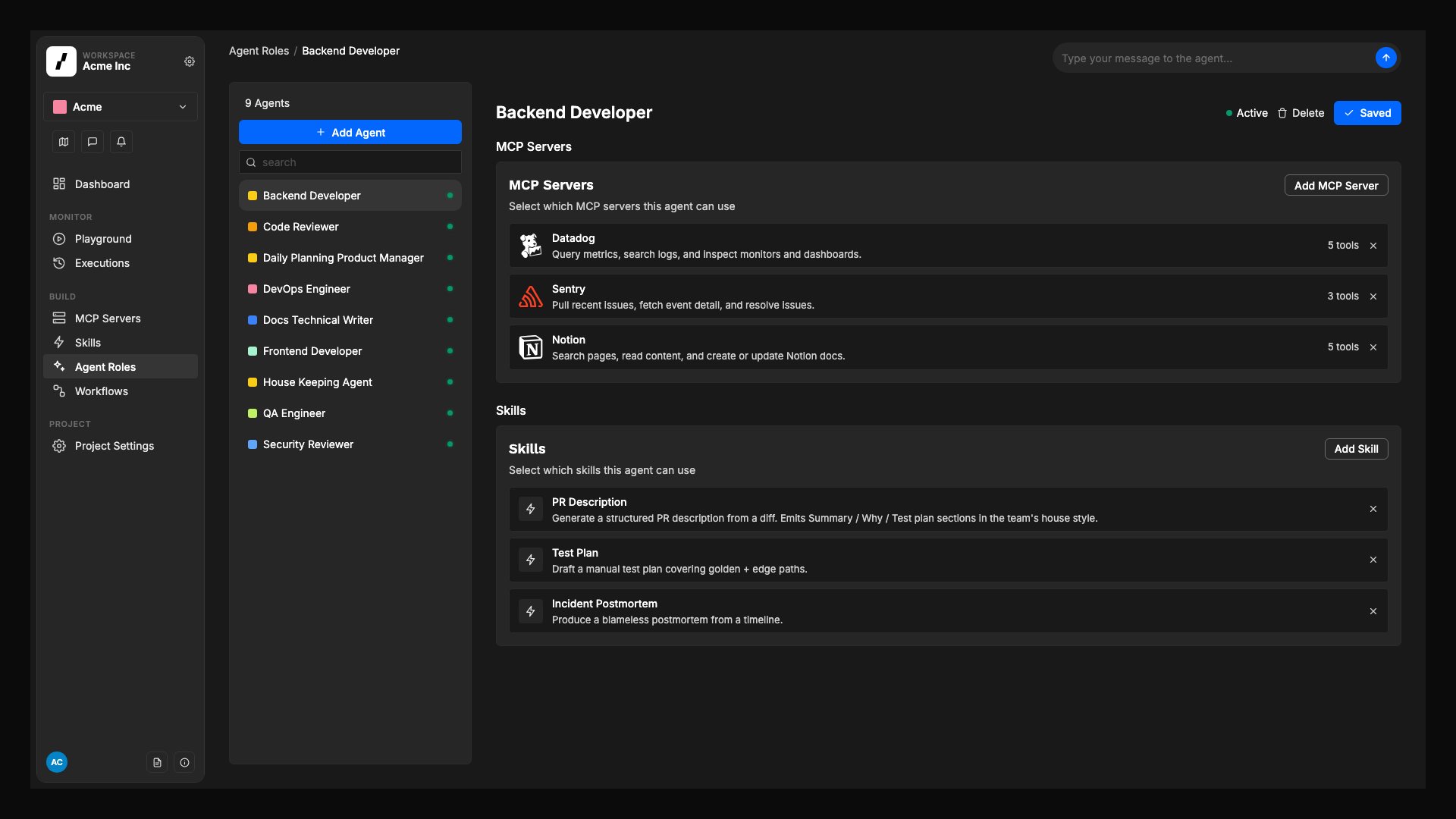
- Skills: assign active skills to the agent so it can follow reusable guidance alongside its base instructions. Add and manage project skills in the project Skills area; skills from the Workspace Library appear in the same picker with a Library badge.
Context parameters in agent instructions
Additional Instructions can reference a context parameter as{{params.<key>}}, for example Reply in {{params.response_language}}. Type {{params. in the editor to pick from the keys visible to the project. Saving the agent checks that every referenced key exists.
The agent’s Context Parameters panel sets values that apply wherever this agent runs. An agent value is the most specific scope, so it wins over the project, repository, workflow, and orchestration values for that agent’s steps only. Two agents in the same run can resolve the same key differently.
Agents in the Workspace Library
An agent is owned by one project or by the Workspace Library. Workflows in any project can run a Library agent; the agent picker in an Agent Run or Agent Session step groups agents under Project and Workspace library. A Library agent can attach only Library MCP servers, skills, and secrets. To share a project agent, select Promote to library on its page after promoting the secrets, MCP servers, and skills it depends on. Promotion moves the agent; workflows that already use it keep working.Assign skills to an agent
Skills are added to the project, or to the Workspace Library, first, then assigned to individual agents. Only enabled skills are available for assignment.1
Open the agent settings
Go to your project’s Agents area and select the agent you want to update.
2
Choose skills for the agent
In the agent’s Skills section, select one or more enabled skills to attach to that agent. Library skills carry a Library badge.
3
Save the agent
Save your changes so the agent uses those skills in future runs.
Remove skills from an agent
If an agent no longer needs a skill, open the same Skills section in the agent settings and remove the skill from the assignment list, then save the agent.Before you assign a skill
- Add the skill in the project Skills area first, or in the Workspace Library if every project should be able to use it.
- Confirm the skill is enabled. Only enabled skills are available for assignment to agents.
- Review the skill details in Skills to make sure you are assigning the right guidance to the right agent.