

Overview
In multi-repository workspaces, Overcut can automatically identify which code repositories are most relevant to a specific ticket or issue. This feature uses intelligent correlation mapping and AI-powered analysis to determine the best repositories to work with, eliminating the need for manual repository selection in your workflows.How Repository Mapping Works
Repository mapping in Overcut operates on two levels:- Related Correlations: Direct links between ticket projects and code repositories
- Automatic Identification: AI-powered analysis that considers correlations, repository hints, and ticket context
Repository Types
- Ticket Projects: Project management systems like Jira, GitHub Issues, Azure DevOps, Linear, or ClickUp that contain tickets, issues, and project information
- Code Repositories: Git repositories containing source code, typically linked to one or more ticket projects
Correlation System
The correlation system connects repositories using the Related Ticket Projects and Related Code Repositories fields:- Each code repository can be linked to multiple ticket projects
- Each ticket project can be linked to multiple code repositories
- Selected repositories appear as colored tags beneath the selector to confirm the relationship
- These correlations are used as the primary signal for repository identification
Correlations are the most reliable way to ensure accurate repository identification. Always set up explicit correlations when possible.
Setting Up Repository Correlations
Step 1: Configure Repository Purposes
First, ensure your repositories are properly configured for their intended use:1
Navigate to Repository Settings
Go to Settings → Integrations → Git and select the repository you want to configure.
2
Set Repository Purposes
In the repository configuration form, set the appropriate checkboxes:
- Use for Code: Enable for repositories containing source code
- Use for Tickets: Enable for project management systems (Jira, GitHub Issues, ClickUp Spaces, etc.)
3
Save Changes
Click Save to apply your configuration.
Step 2: Link Related Ticket Projects to Code Repositories
You can establish correlations from either side of the mapping. Use whichever entry point matches your workflow.1
Select a Code Repository
Choose a repository that has Use for Code enabled.
2
Choose Related Ticket Projects
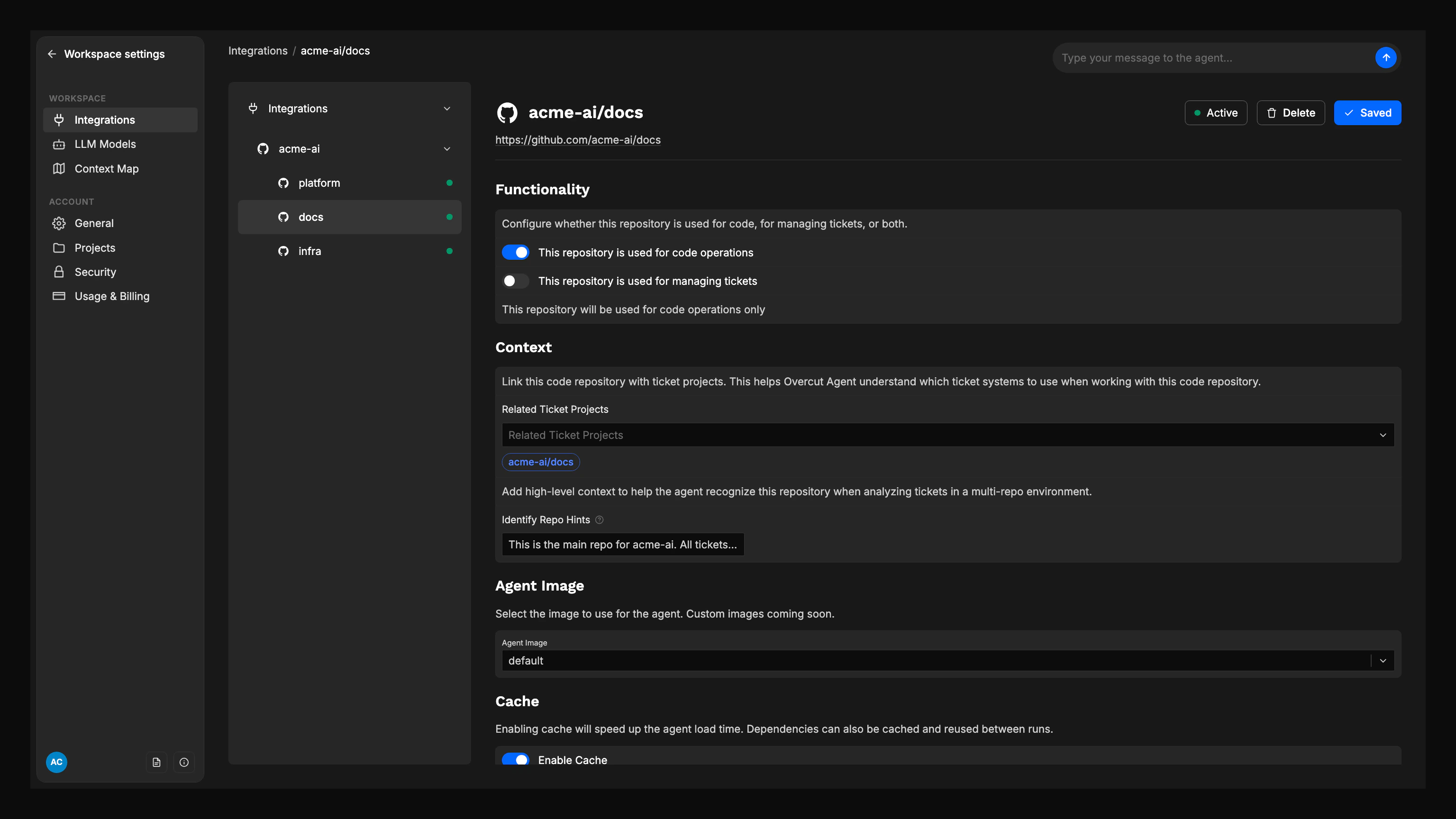
In the Related Ticket Projects field, select the ticket projects this code repository should be linked to.
3
Confirm the Tags
Review the colored ticket project tags displayed under the selector to verify the relationship.
4
Save Correlations
Click Save to establish the links.
Ticket-Side Linking
Ticket projects can also link to code repositories from the ticket configuration view using Related Code Repositories.1
Select a Ticket Project
Choose a repository that has Use for Tickets enabled.
2
Choose Related Code Repositories
In the Related Code Repositories field, select the code repositories you want to associate with the ticket project.
3
Review Linked Tags
Confirm the selected repositories appear as colored tags beneath the selector.
4
Save Changes
Click Save to apply the links.
Step 3: Add Repository Identification Hints
For even better identification accuracy, add hints to your code repositories:1
Navigate to Repository Settings
Select a code repository in your workspace settings.
2
Add Identification Hints
In the Identify Repo Hints field, add high-level context that helps the system recognize when this repository is relevant:
- Key domains or components (e.g., “backend”, “frontend”, “mobile app”)
- Service names (e.g., “user-service”, “payment-gateway”)
- Technology keywords (e.g., “React”, “Python”, “Kubernetes”)
- Business domain terms (e.g., “billing”, “authentication”, “reporting”)
3
Save Configuration
Click Save to apply your hints.
Using the Identify Repository Step
Therepo.identify action automatically determines which repositories are most relevant to a ticket context. This step runs early in workflows that originate from ticket triggers.
Adding the Identify Repository Step
1
Open Workflow Builder
Navigate to Workflows and open or create a workflow.
2
Add the Step
From the action palette, drag Identify Repositories to your workflow canvas.
3
Configure Parameters
Set the following parameters:
- Max Results: Maximum number of repositories to return (default: 1, range: 1-20)
- Min Confidence: Minimum confidence threshold (default: 0.2, range: 0-1)
- Identification Hints: Additional context to guide identification (optional)
4
Connect to Workflow
Connect this step after your trigger and before any repository-dependent actions.
Step Parameters Explained
- Max Results: Controls how many candidate repositories are returned. Use 1 for single-repo workflows, higher values for multi-repo scenarios.
- Min Confidence: Filters out low-confidence matches. Higher values (0.7+) ensure only strong matches are returned.
- Identification Hints: Additional context that can help the AI make better decisions, especially when correlations are unclear.
How Identification Works
The identification process follows this logic:- Correlation Check: First, looks for explicitly correlated repositories
- Context Analysis: Analyzes ticket content (title, description, labels, components)
- Repository Hints: Considers repository-level identification hints
- Scoring: Combines all signals to produce confidence scores
- Filtering: Applies minimum confidence threshold
- Ranking: Sorts by confidence, with tie-breaking by repository name
Using Identified Repositories in Downstream Steps
Once repositories are identified, you can reference them in subsequent workflow steps using templating expressions.Referencing Repository Information
The identify step returns an array of candidates with the following structure:Template Examples
Basic Repository Reference:Coming Soon: Currently, the
git.clone action supports cloning a single repository at a time. In a future release, it will support cloning multiple top repositories in a single step, making multi-repository workflows more efficient.Context parameter values set on a repository come from the repository that triggered the run, or the one selected for a manual run. Identifying a different repository in this step does not change the values the run already resolved.
Best Practices
1. Set Up Explicit Correlations
- Always create explicit correlations between ticket projects and code repositories
- This provides the most reliable identification results
- Correlations take precedence over AI-based heuristics
2. Use Descriptive Repository Hints
- Include key technologies, domains, and components
- Use consistent terminology across related repositories
- Update hints when repository scope changes
3. Configure Appropriate Confidence Thresholds
- Use 0.7+ for production workflows requiring high accuracy
- Use 0.4-0.6 for exploratory or development workflows
- Monitor identification accuracy and adjust thresholds accordingly
4. Handle Multiple Repository Scenarios
- Set
maxResultsappropriately for your use case - Consider whether you need to process all identified repositories
- Use conditional logic for different repository counts
5. Test Your Workflows
- Test with various ticket types and contexts
- Verify repository identification accuracy
- Check that downstream steps receive the expected repository information
Troubleshooting
Common Issues
No repositories identified:- Check that correlations are properly set up
- Verify repository purposes are correctly configured
- Lower the confidence threshold temporarily
- Add more descriptive repository hints
- Review and update repository correlations
- Check repository hints for accuracy
- Verify ticket context is being passed correctly
- Consider adding more specific identification hints
- Review correlation setup for the ticket project
- Check if multiple code repositories should actually be linked
- Adjust
maxResultsparameter if needed
Debugging Tips
- Check the workflow execution logs for identification details
- Review the confidence scores and reasoning provided
- Verify that repository hints are being used correctly
- Test with different ticket contexts to understand identification patterns
Summary
Repository mapping and automatic identification in Overcut provides:- Explicit correlations between ticket projects and code repositories
- AI-powered identification using context and hints
- Configurable confidence thresholds for accuracy control
- Flexible templating for downstream workflow steps
- Scalable architecture that works with any number of repositories
ClickUp users: Each ClickUp Space you connect appears as a separate ticket repository. Link Spaces to code repositories just like you would with Jira projects or Linear teams. See the ClickUp integration guide for setup details.
How Repository Mapping Powers Multi-Repository Workflows
Dynamic Repository Selection
Repository mapping enables therepo.identify action to automatically select relevant repositories, which then seamlessly chain with git.clone:
Correlation-Based Confidence
Well-configured repository mappings provide the highest confidence scores in identification results:- Explicit correlations: 0.9-1.0 confidence (highest priority)
- AI analysis with hints: 0.6-0.9 confidence
- AI analysis without hints: 0.3-0.7 confidence
Multi-Repository Correlation Scenarios
Configure correlations to support different multi-repository patterns: Microservices Architecture:repo.identify will automatically find the relevant repositories based on the correlations. Use the top match for cloning (for example, repoFullName: "{{outputs.[identify-repos].[0].repoFullName}}"), or loop through the results in separate steps if you need to work with multiple repositories.