> ## Documentation Index
> Fetch the complete documentation index at: https://docs.overcut.ai/llms.txt
> Use this file to discover all available pages before exploring further.
# LLM Models
> Connect your own LLM providers, configure custom models, and control which model each agent uses.
Overcut ships with a set of system-managed models, but you can bring your own API keys (BYOK) to connect models from any supported provider. Custom models are configured once at the workspace level and can then be assigned to individual agents, workflows, or set as the workspace default.
***
## Overview
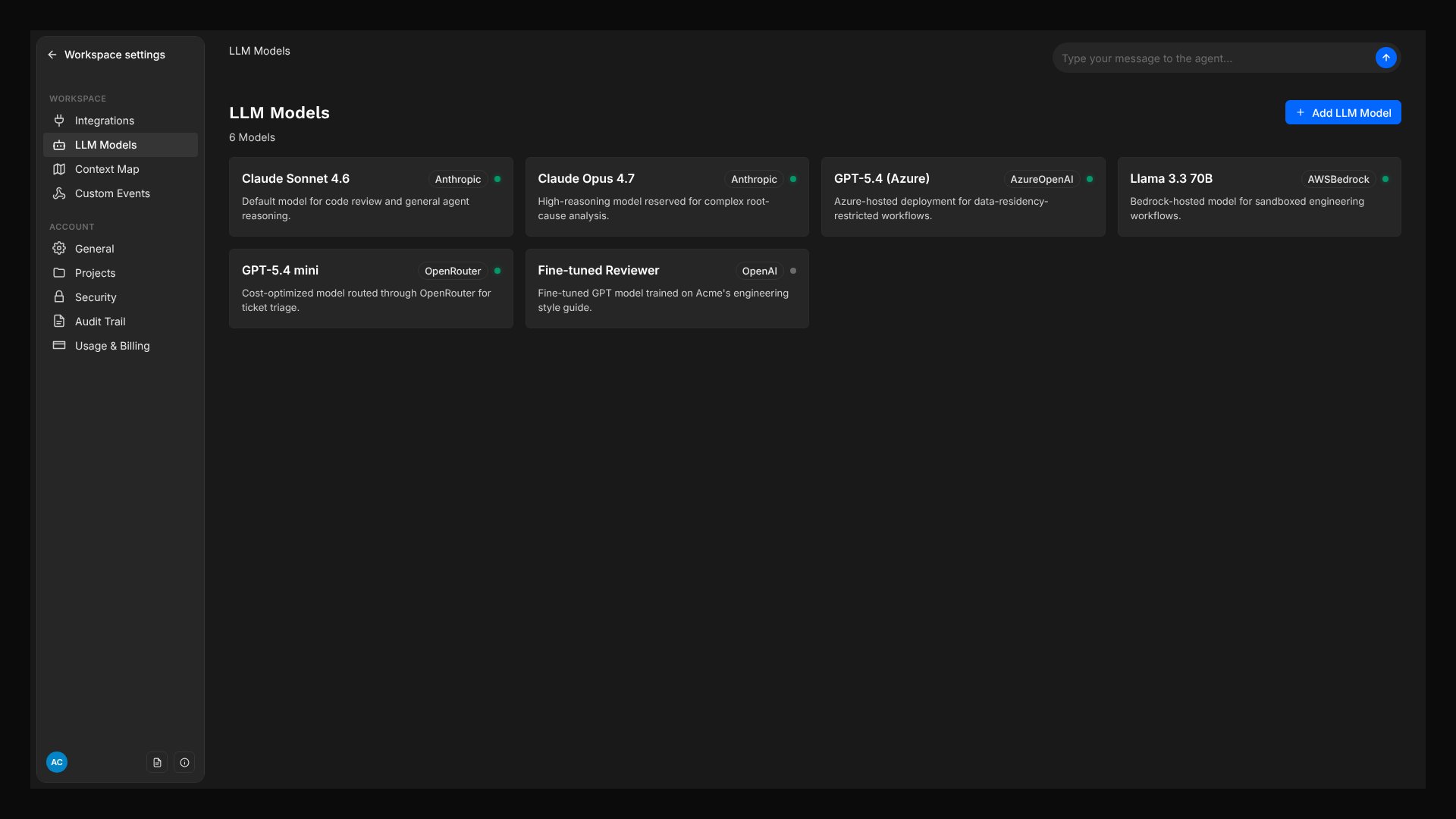 Connect your existing API keys from OpenAI, Anthropic, Azure, AWS Bedrock, or OpenRouter.
Assign a specific model to each agent: use a fast model for triage and a powerful model for code review.
Set defaults at the workspace, workflow, or agent level. Agents inherit the closest configured default automatically.
API keys are encrypted at rest and never exposed in the UI, logs, or to the LLM itself.
***
## Supported Providers
| Provider | Config Type | Notes |
| -------------------------------- | ------------------------------- | --------------------------------------------------------- |
| **OpenAI** | API key + model name | Supports custom `baseURL` for proxies and compatible APIs |
| **Azure OpenAI** | API key + endpoint + deployment | Standard Azure OpenAI Service |
| **Azure OpenAI (Responses API)** | API key + model + endpoint | Azure-native Responses API |
| **Anthropic** | API key + model name | Claude models via Anthropic's API directly |
| **AWS Bedrock** | Region + credentials | Claude models and others via AWS Bedrock Converse API |
| **OpenRouter** | API key + model name | Access 200+ models through a single API key |
***
## Creating a Custom Model
Navigate to LLM Models in the main menu.
Click the Add LLM Model button. Enter a display name (e.g. "Claude Sonnet for Production") and select a provider.
Fill in the provider-specific configuration. Each provider requires different fields. See the Provider Configuration section below.
Overcut validates the configuration against the provider schema, encrypts your API key, and stores the model. It is now available for assignment.
Once a model is created, the provider and model key cannot be changed. To switch providers, create a new model and reassign your agents.
***
## Provider Configuration
### OpenAI
```json theme={null}
{
"apiKey": "sk-...",
"model": "gpt-4.1"
}
```
Your OpenAI API key.
The model identifier (e.g.
Connect your existing API keys from OpenAI, Anthropic, Azure, AWS Bedrock, or OpenRouter.
Assign a specific model to each agent: use a fast model for triage and a powerful model for code review.
Set defaults at the workspace, workflow, or agent level. Agents inherit the closest configured default automatically.
API keys are encrypted at rest and never exposed in the UI, logs, or to the LLM itself.
***
## Supported Providers
| Provider | Config Type | Notes |
| -------------------------------- | ------------------------------- | --------------------------------------------------------- |
| **OpenAI** | API key + model name | Supports custom `baseURL` for proxies and compatible APIs |
| **Azure OpenAI** | API key + endpoint + deployment | Standard Azure OpenAI Service |
| **Azure OpenAI (Responses API)** | API key + model + endpoint | Azure-native Responses API |
| **Anthropic** | API key + model name | Claude models via Anthropic's API directly |
| **AWS Bedrock** | Region + credentials | Claude models and others via AWS Bedrock Converse API |
| **OpenRouter** | API key + model name | Access 200+ models through a single API key |
***
## Creating a Custom Model
Navigate to LLM Models in the main menu.
Click the Add LLM Model button. Enter a display name (e.g. "Claude Sonnet for Production") and select a provider.
Fill in the provider-specific configuration. Each provider requires different fields. See the Provider Configuration section below.
Overcut validates the configuration against the provider schema, encrypts your API key, and stores the model. It is now available for assignment.
Once a model is created, the provider and model key cannot be changed. To switch providers, create a new model and reassign your agents.
***
## Provider Configuration
### OpenAI
```json theme={null}
{
"apiKey": "sk-...",
"model": "gpt-4.1"
}
```
Your OpenAI API key.
The model identifier (e.g. gpt-4.1, gpt-4o, o3).
Optional. Override the API base URL for proxies or OpenAI-compatible endpoints.
### Azure OpenAI
```json theme={null}
{
"apiKey": "your-azure-key",
"baseURL": "https://your-resource.openai.azure.com",
"azureOpenAIApiDeploymentName": "gpt-4-deployment",
"apiVersion": "2024-02-15-preview"
}
```
Your Azure OpenAI resource key.
The Azure OpenAI resource endpoint URL.
The name of the deployed model in your Azure resource.
The Azure OpenAI API version (e.g. 2024-02-15-preview).
### Anthropic
```json theme={null}
{
"anthropicApiKey": "sk-ant-...",
"model": "claude-sonnet-4-20250514"
}
```
Your Anthropic API key.
The Claude model identifier (e.g. claude-sonnet-4-20250514, claude-opus-4-20250514).
### AWS Bedrock
```json theme={null}
{
"region": "us-east-1",
"credentials": {
"accessKeyId": "AKIA...",
"secretAccessKey": "..."
}
}
```
The AWS region where your Bedrock models are available.
AWS credentials with accessKeyId and secretAccessKey. If omitted, Overcut uses the default credential chain (IAM role, environment variables).
### OpenRouter
```json theme={null}
{
"apiKey": "sk-or-...",
"model": "anthropic/claude-sonnet-4"
}
```
Your OpenRouter API key.
The OpenRouter model identifier, in provider/model format (e.g. anthropic/claude-sonnet-4, openai/gpt-4.1).
***
## Assigning Models
### Per-Agent
Each agent has a model selector in its settings. Choose a specific model or leave it on **Default Model** to inherit from the workflow or workspace.
Navigate to Agent Roles and select an agent.
Use the Model dropdown to pick a custom model or Default Model.
### Per-Workflow
Set a workflow-level default in the Workflow Builder so all agents in that workflow inherit the same model unless they have their own override.
Click the canvas background to open Workflow Settings.
Select a model from the Default LLM Model dropdown.
### Per-Workspace
Set a workspace-wide default in **Account → Settings**. All workflows and agents that don't specify their own model will use this default.
***
## Model Cascade
When an agent executes, Overcut resolves its model by walking down this cascade and using the first configured value:
1. **Coordinator override**: `coordinatorModelKey` on an `agent.session` step (applies only to the coordinator, never to child agents)
2. **Agent model**: the agent's own model selection
3. **Workflow default**: the Default LLM Model set in Workflow Settings
4. **Workspace default**: configured in Account → Settings
5. **System default**: Overcut's managed default model
For a step-by-step walkthrough of configuring defaults at each level, see the Default Model Configuration guide.
***
## Overcut Agent vs. Claude Code
Overcut supports two execution engines. The engine is selected per workflow step in the Workflow Builder.
### Overcut Agent (default)
The default engine. Runs on Overcut's agent architecture with full model flexibility.
* **Model selection**: Follows the cascade described above. You control exactly which model each agent uses.
* **Providers**: Any supported provider (OpenAI, Azure, Anthropic, AWS Bedrock, OpenRouter)
* **API keys**: Uses workspace-configured custom models, or Overcut's system models if no custom model is set
* **Billing**: Through Overcut when using system models, or directly against your provider when using custom models
### Claude Code (Claude Agent SDK)
An alternative engine that runs Anthropic's Claude Code Agent SDK directly.
* **Model selection**: Automatic. The Claude SDK chooses the optimal model. No model configuration is available.
* **Providers**: Anthropic only
* **API keys**: Requires your own Anthropic API key, configured in **Security → Workspace Secrets**
* **Billing**: Directly against your Anthropic account
### When to Use Each
| Scenario | Recommended Engine |
| --------------------------------------------------------------------------- | ------------------ |
| You need to use a specific model or provider (e.g. GPT-4.1, Azure, Bedrock) | **Overcut Agent** |
| You want model selection controlled per agent/workflow/workspace | **Overcut Agent** |
| You want to leverage Claude Code's native coding capabilities | **Claude Code** |
| You already have an Anthropic API key and want direct billing | **Claude Code** |
Custom model selection (BYOK) applies only to the Overcut Agent engine. The Claude Code engine always uses Claude's automatic model selection with your Anthropic API key.
Both engines support MCP Servers, the same agent roles, and the same Overcut tools (ticketing, pull requests, git operations). The difference is in model selection and the underlying execution architecture.
***
## Security
* API keys are **encrypted at rest** and never returned through the UI or API.
* Decrypting a model's configuration requires the `llmModel.readEncryptedConfig` permission.
* System models (managed by Overcut) cannot be edited or deleted by workspace users.
***
## Next Steps
* **[Default Model Configuration](/docs/quick-starts/default-model-configuration)**: Step-by-step guide for setting workspace, workflow, and coordinator defaults
* **[Claude Agent SDK Integration](/docs/integrations/claude-agent-sdk)**: Detailed setup guide for the Claude Code engine
* **[Vault](/docs/reference/vault)**: Manage secrets used across your workspace
* **[Core Building Blocks](/docs/building-blocks)**: Understand how agents, actions, and triggers connect