> ## Documentation Index
> Fetch the complete documentation index at: https://docs.overcut.ai/llms.txt
> Use this file to discover all available pages before exploring further.
# Repository Selector
> Learn how to precisely target which repositories a scheduled workflow should run against using provider filters, regex name patterns, and purpose flags. Includes concepts, UI guide, YAML examples, and best-practice tips.
The **Repository Selector** is a powerful filtering mechanism that tells Overcut **which Git repositories or projects a scheduled workflow should operate on**.
The repository selector can be used to select both code repositories and ticket projects/ repositories.
See the [Scheduled Workflows guide](/docs/workflows/scheduled-workflows) for an end-to-end walkthrough of cron triggers and execution modes.
## Field Reference
| Field | Type | Description |
| ------------------- | -------------- | ------------------------------------------------------------------------------------------------------------------------------------------------------------------------------------------------------------------------ |
| **Name Pattern** | String (regex) | Regular expression to match against the **full repository name** (e.g., `myorg/my-repo`). For example, `^myorg/backend-.*` matches all repos in `myorg` starting with `backend-`. Leave empty to match all repositories. |
| **Exclude Pattern** | String (regex) | Regular expression to exclude repositories by **full name**. For example, `^.*-archived$` excludes repos ending with `-archived`. Exclusions run *after* inclusions. |
| **Provider** | String | Filter by a specific Git provider. Options: `Github`, `Gitlab`, `Bitbucket`, `AzureDevOps`, `Jira`. Leave empty to match *any* provider. |
| **Use For Code** | Boolean | If ON, only repositories marked **Use for Code** in *Repository Settings* are considered. |
| **Use For Tickets** | Boolean | If ON, only repositories marked **Use for Tickets** are considered. Useful for selecting ticket projects (Jira, GitHub Issues). |
Overcut applies an upper bound of **100 repositories per evaluation** to protect your workspace from accidental fan-out. If your selector matches more than 100 repos, only the first 100 (sorted alphabetically) will be used and a warning appears in the UI and execution logs.
***
## Authoring Selectors in the UI
1. **Open Workflow Builder** and add/edit a Trigger or Action that supports selectors (e.g., a *Scheduled* trigger in *Per-Repository* mode).
2. In the **Repository Selector** panel, fill in the fields described above.\\
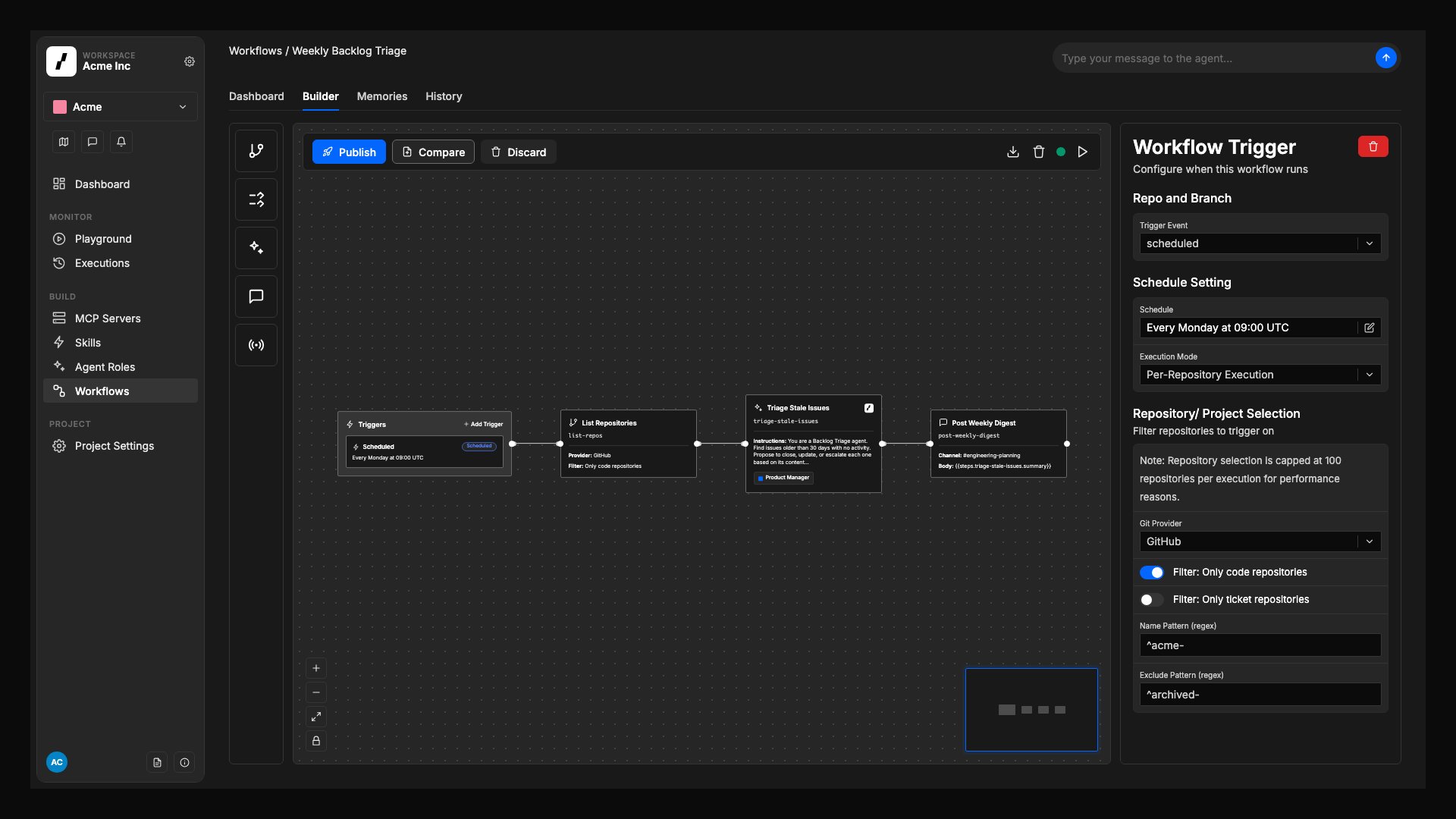 3. Click **Save**. The selector definition is now embedded in the workflow version and will be evaluated at runtime.
`namePattern` matches the **full repository name** including the organization (e.g., `acme/web-app`)
Use regex alternation `(pattern1|pattern2)` to match multiple patterns
## Real-World Selector Examples
| Goal | Example Selector |
| --------------------------------------------------------------- | --------------------------------------------------------------- |
| **Run on all GitHub repos in *acme* org** | provider: `Github`, namePattern: `^acme/.*`, useForCode: `true` |
| **Run on repos starting with `infra-` in any org** | namePattern: `"/infra-"` |
| **Skip archived or deprecated repos** | excludePattern: `(-archive\|-deprecated)$` |
| **Operate on ticket projects only (Jira & GitHub Issues)** | useForTickets: `true` |
| **Multiple orgs: match repos in *acme* or *beta* orgs** | namePattern: `^(acme\|beta)/.*` |
| **Complex pattern: backend or API repos, excluding test repos** | namePattern: `/(backend\|api)-`, excludePattern: `-test$` |
***
## Best Practices & Gotchas
1. **Patterns Match Full Names** – Remember that `namePattern` and `excludePattern` match against the full repository name (e.g., `myorg/my-repo`), not just the repo name. To filter by organization, use `^orgname/` in your pattern.
2. **Use Regex Alternation for Multiple Patterns** – To match multiple patterns, use regex alternation syntax: `^(pattern1|pattern2|pattern3)`. For example: `^acme/(web-.*|api-.*)` matches repos in the `acme` org starting with `web-` or `api-`.
3. **Start Narrow, Then Broaden** – Begin with tight patterns, verify run counts, then relax filters if needed.
4. **Avoid Overly Broad Selectors** – Matching *every* repo can create hundreds of workflow runs. Use specific patterns and purpose flags to limit scope.
5. **Monitor Execution Volume** – Check *Execution History* after enabling a new schedule to confirm expected run counts.
6. **Combine with Repository Mapping** – For ticket-triggered workflows, prefer [Repository Mapping](/docs/repositories/repository-mapping) and [`repo.identify`](/docs/workflows/repo-identify) over broad selectors.
***
## Further Reading
* [Scheduled Workflows](/docs/workflows/scheduled-workflows)
* [Workflow Execution Control](/docs/workflows/workflow-execution-control)
* [Repository Mapping](/docs/repositories/repository-mapping)
3. Click **Save**. The selector definition is now embedded in the workflow version and will be evaluated at runtime.
`namePattern` matches the **full repository name** including the organization (e.g., `acme/web-app`)
Use regex alternation `(pattern1|pattern2)` to match multiple patterns
## Real-World Selector Examples
| Goal | Example Selector |
| --------------------------------------------------------------- | --------------------------------------------------------------- |
| **Run on all GitHub repos in *acme* org** | provider: `Github`, namePattern: `^acme/.*`, useForCode: `true` |
| **Run on repos starting with `infra-` in any org** | namePattern: `"/infra-"` |
| **Skip archived or deprecated repos** | excludePattern: `(-archive\|-deprecated)$` |
| **Operate on ticket projects only (Jira & GitHub Issues)** | useForTickets: `true` |
| **Multiple orgs: match repos in *acme* or *beta* orgs** | namePattern: `^(acme\|beta)/.*` |
| **Complex pattern: backend or API repos, excluding test repos** | namePattern: `/(backend\|api)-`, excludePattern: `-test$` |
***
## Best Practices & Gotchas
1. **Patterns Match Full Names** – Remember that `namePattern` and `excludePattern` match against the full repository name (e.g., `myorg/my-repo`), not just the repo name. To filter by organization, use `^orgname/` in your pattern.
2. **Use Regex Alternation for Multiple Patterns** – To match multiple patterns, use regex alternation syntax: `^(pattern1|pattern2|pattern3)`. For example: `^acme/(web-.*|api-.*)` matches repos in the `acme` org starting with `web-` or `api-`.
3. **Start Narrow, Then Broaden** – Begin with tight patterns, verify run counts, then relax filters if needed.
4. **Avoid Overly Broad Selectors** – Matching *every* repo can create hundreds of workflow runs. Use specific patterns and purpose flags to limit scope.
5. **Monitor Execution Volume** – Check *Execution History* after enabling a new schedule to confirm expected run counts.
6. **Combine with Repository Mapping** – For ticket-triggered workflows, prefer [Repository Mapping](/docs/repositories/repository-mapping) and [`repo.identify`](/docs/workflows/repo-identify) over broad selectors.
***
## Further Reading
* [Scheduled Workflows](/docs/workflows/scheduled-workflows)
* [Workflow Execution Control](/docs/workflows/workflow-execution-control)
* [Repository Mapping](/docs/repositories/repository-mapping)