> ## Documentation Index
> Fetch the complete documentation index at: https://docs.overcut.ai/llms.txt
> Use this file to discover all available pages before exploring further.
# Repository Mapping
> Learn how to map ticket projects to code repositories and use the identify-repo step to automatically identify the most relevant repositories for your tickets.
## Overview
In multi-repository workspaces, Overcut can automatically identify which code repositories are most relevant to a specific ticket or issue. This feature uses intelligent correlation mapping and AI-powered analysis to determine the best repositories to work with, eliminating the need for manual repository selection in your workflows.
## How Repository Mapping Works
Repository mapping in Overcut operates on two levels:
1. **Related Correlations**: Direct links between ticket projects and code repositories
2. **Automatic Identification**: AI-powered analysis that considers correlations, repository hints, and ticket context
### Repository Types
* **Ticket Projects**: Project management systems like Jira, GitHub Issues, Azure DevOps, Linear, or ClickUp that contain tickets, issues, and project information
* **Code Repositories**: Git repositories containing source code, typically linked to one or more ticket projects
### Correlation System
The correlation system connects repositories using the **Related Ticket Projects** and **Related Code Repositories** fields:
* Each code repository can be linked to multiple ticket projects
* Each ticket project can be linked to multiple code repositories
* Selected repositories appear as colored tags beneath the selector to confirm the relationship
* These correlations are used as the primary signal for repository identification
Correlations are the most reliable way to ensure accurate repository identification. Always set up explicit correlations when possible.
## Setting Up Repository Correlations
### Step 1: Configure Repository Purposes
First, ensure your repositories are properly configured for their intended use:
Go to **Settings → Integrations → Git** and select the repository you want to configure.
In the repository configuration form, set the appropriate checkboxes:
* **Use for Code**: Enable for repositories containing source code
* **Use for Tickets**: Enable for project management systems (Jira, GitHub Issues, ClickUp Spaces, etc.)
Click **Save** to apply your configuration.
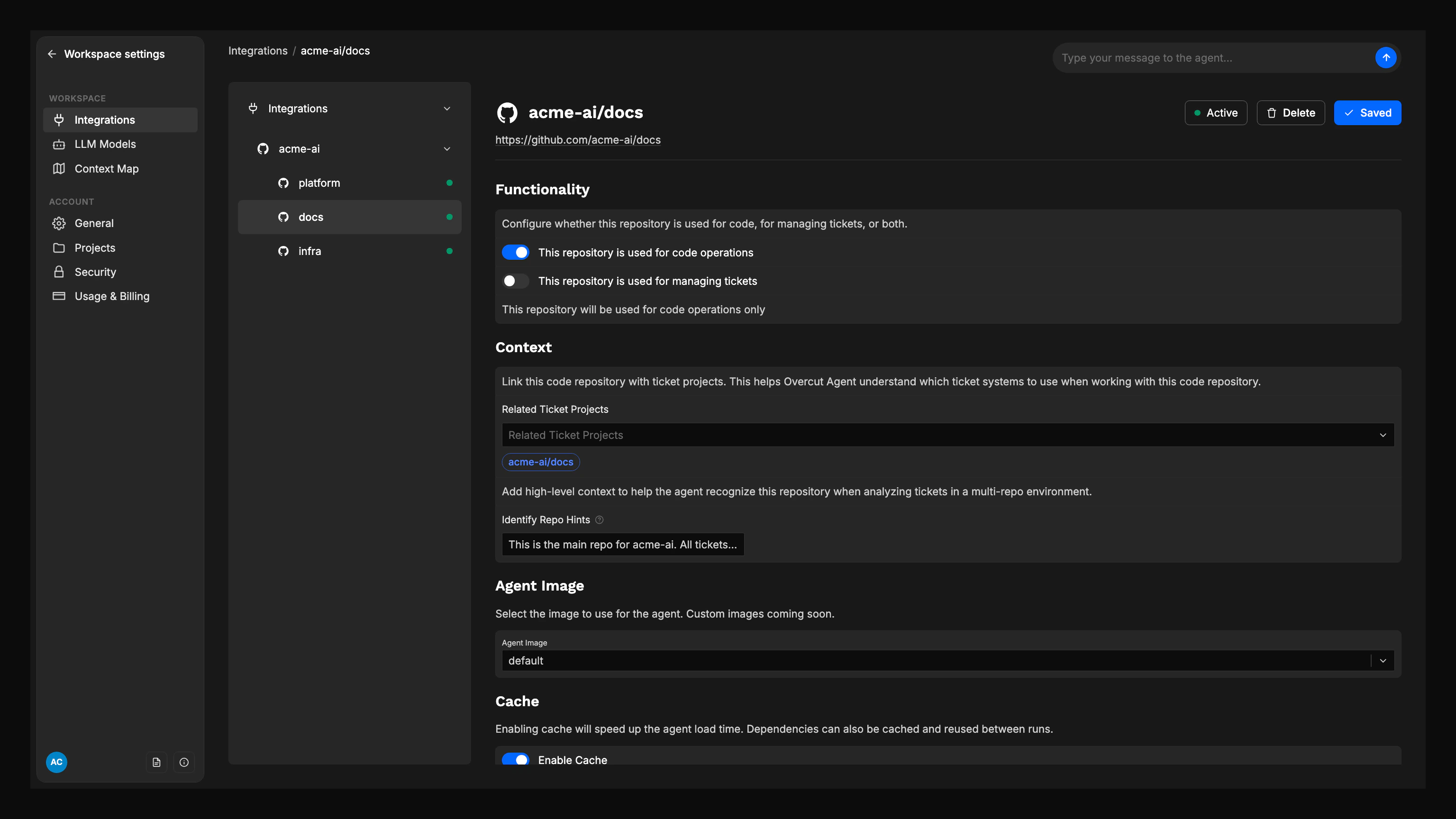
### Step 2: Link Related Ticket Projects to Code Repositories
You can establish correlations from either side of the mapping. Use whichever entry point matches your workflow.
Choose a repository that has **Use for Code** enabled.
In the **Related Ticket Projects** field, select the ticket projects this code repository should be linked to.
Review the colored ticket project tags displayed under the selector to verify the relationship.
Click **Save** to establish the links.
 ### Ticket-Side Linking
Ticket projects can also link to code repositories from the ticket configuration view using **Related Code Repositories**.
Choose a repository that has **Use for Tickets** enabled.
In the **Related Code Repositories** field, select the code repositories you want to associate with the ticket project.
Confirm the selected repositories appear as colored tags beneath the selector.
Click **Save** to apply the links.
### Step 3: Add Repository Identification Hints
For even better identification accuracy, add hints to your code repositories:
Select a code repository in your workspace settings.
In the **Identify Repo Hints** field, add high-level context that helps the system recognize when this repository is relevant:
* Key domains or components (e.g., "backend", "frontend", "mobile app")
* Service names (e.g., "user-service", "payment-gateway")
* Technology keywords (e.g., "React", "Python", "Kubernetes")
* Business domain terms (e.g., "billing", "authentication", "reporting")
Click **Save** to apply your hints.
**Example Hints:**
* For a backend API: "REST API, user management, authentication, database"
* For a frontend app: "React, user interface, dashboard, forms"
* For a mobile app: "iOS, Android, mobile, user experience"
## Using the Identify Repository Step
The `repo.identify` action automatically determines which repositories are most relevant to a ticket context. This step runs early in workflows that originate from ticket triggers.
### Adding the Identify Repository Step
Navigate to **Workflows** and open or create a workflow.
From the action palette, drag **Identify Repositories** to your workflow canvas.
Set the following parameters:
* **Max Results**: Maximum number of repositories to return (default: 1, range: 1-20)
* **Min Confidence**: Minimum confidence threshold (default: 0.2, range: 0-1)
* **Identification Hints**: Additional context to guide identification (optional)
Connect this step after your trigger and before any repository-dependent actions.
### Step Parameters Explained
* **Max Results**: Controls how many candidate repositories are returned. Use 1 for single-repo workflows, higher values for multi-repo scenarios.
* **Min Confidence**: Filters out low-confidence matches. Higher values (0.7+) ensure only strong matches are returned.
* **Identification Hints**: Additional context that can help the AI make better decisions, especially when correlations are unclear.
## How Identification Works
The identification process follows this logic:
1. **Correlation Check**: First, looks for explicitly correlated repositories
2. **Context Analysis**: Analyzes ticket content (title, description, labels, components)
3. **Repository Hints**: Considers repository-level identification hints
4. **Scoring**: Combines all signals to produce confidence scores
5. **Filtering**: Applies minimum confidence threshold
6. **Ranking**: Sorts by confidence, with tie-breaking by repository name
## Using Identified Repositories in Downstream Steps
Once repositories are identified, you can reference them in subsequent workflow steps using templating expressions.
### Referencing Repository Information
The identify step returns an array of candidates with the following structure:
```json theme={null}
{
"repoFullName": "organization/repository-name",
"confidence": 0.85,
"reasoning": "Strong correlation with ticket repository and matching component labels"
}
```
### Template Examples
**Basic Repository Reference:**
```yaml theme={null}
repoFullName: "{{outputs.identify-repos.[0].repoFullName}}"
```
**Conditional Fallback:**
```yaml theme={null}
repoFullName: "{{#if outputs.identify-repos.[0]}}{{outputs.identify-repos.[0].repoFullName}}{{else}}{{trigger.repository.fullName}}{{/if}}"
```
**Coming Soon**: Currently, the `git.clone` action supports cloning a single repository at a time. In a future release, it will support cloning multiple top repositories in a single step, making multi-repository workflows more efficient.
**Important**: If your step ID contains hyphens (e.g., `identify-repos`), use bracket notation: `{{outputs.[identify-repos].[0].repoFullName}}`
## Best Practices
### 1. Set Up Explicit Correlations
* Always create explicit correlations between ticket projects and code repositories
* This provides the most reliable identification results
* Correlations take precedence over AI-based heuristics
### 2. Use Descriptive Repository Hints
* Include key technologies, domains, and components
* Use consistent terminology across related repositories
* Update hints when repository scope changes
### 3. Configure Appropriate Confidence Thresholds
* Use 0.7+ for production workflows requiring high accuracy
* Use 0.4-0.6 for exploratory or development workflows
* Monitor identification accuracy and adjust thresholds accordingly
### 4. Handle Multiple Repository Scenarios
* Set `maxResults` appropriately for your use case
* Consider whether you need to process all identified repositories
* Use conditional logic for different repository counts
### 5. Test Your Workflows
* Test with various ticket types and contexts
* Verify repository identification accuracy
* Check that downstream steps receive the expected repository information
## Troubleshooting
### Common Issues
**No repositories identified:**
* Check that correlations are properly set up
* Verify repository purposes are correctly configured
* Lower the confidence threshold temporarily
* Add more descriptive repository hints
**Wrong repository identified:**
* Review and update repository correlations
* Check repository hints for accuracy
* Verify ticket context is being passed correctly
* Consider adding more specific identification hints
**Multiple repositories when expecting one:**
* Review correlation setup for the ticket project
* Check if multiple code repositories should actually be linked
* Adjust `maxResults` parameter if needed
### Debugging Tips
* Check the workflow execution logs for identification details
* Review the confidence scores and reasoning provided
* Verify that repository hints are being used correctly
* Test with different ticket contexts to understand identification patterns
## Summary
Repository mapping and automatic identification in Overcut provides:
* **Explicit correlations** between ticket projects and code repositories
* **AI-powered identification** using context and hints
* **Configurable confidence thresholds** for accuracy control
* **Flexible templating** for downstream workflow steps
* **Scalable architecture** that works with any number of repositories
By properly configuring correlations, adding descriptive hints, and using the identify repository step, you can create workflows that automatically work with the most relevant repositories for each ticket, significantly improving automation efficiency and accuracy.
Start with explicit correlations for your most important repositories, then gradually add identification hints to improve accuracy for edge cases and new repositories.
**ClickUp users**: Each ClickUp Space you connect appears as a separate ticket repository. Link Spaces to code repositories just like you would with Jira projects or Linear teams. See the [ClickUp integration guide](/docs/integrations/clickup) for setup details.
## How Repository Mapping Powers Multi-Repository Workflows
### **Dynamic Repository Selection**
Repository mapping enables the `repo.identify` action to automatically select relevant repositories, which then seamlessly chain with `git.clone`:
```yaml theme={null}
steps:
# Step 1: Identify repositories using mapping correlations
- id: "identify-repos"
name: "Identify Relevant Repositories"
action: "repo.identify"
params:
maxResults: 3
minConfidence: 0.7
# Step 2: Clone the top identified repository
- id: "clone-repo"
name: "Clone Top Repository"
action: "git.clone"
params:
repoFullName: "{{outputs.[identify-repos].[0].repoFullName}}"
branch: "main"
# Step 3: Process across identified repositories
- id: "analyze-issue"
name: "Multi-Repository Analysis"
action: "agent.session"
params:
goal: "Analyze the issue across all relevant codebases"
instruction: |
Identified repositories based on correlations:
{{#each outputs.[identify-repos]}}
- {{this.repoFullName}} (confidence: {{this.confidence}})
Reasoning: {{this.reasoning}}
{{/each}}
```
### **Correlation-Based Confidence**
Well-configured repository mappings provide the highest confidence scores in identification results:
* **Explicit correlations**: 0.9-1.0 confidence (highest priority)
* **AI analysis with hints**: 0.6-0.9 confidence
* **AI analysis without hints**: 0.3-0.7 confidence
This means properly mapped repositories will always be selected first in multi-repository workflows.
### **Multi-Repository Correlation Scenarios**
Configure correlations to support different multi-repository patterns:
**Microservices Architecture:**
```
Jira Project: "ECOM" (E-commerce)
Correlated Repositories:
- ecom/frontend (User interface)
- ecom/api-gateway (API routing)
- ecom/user-service (User management)
- ecom/payment-service (Payment processing)
- ecom/inventory-service (Inventory management)
```
**Full-Stack Application:**
```
Jira Project: "WEBAPP" (Web Application)
Correlated Repositories:
- webapp/client (React frontend)
- webapp/server (Node.js backend)
- webapp/shared (Shared utilities)
- webapp/database (Schema and migrations)
```
**Cross-Platform Product:**
```
Jira Project: "MOBILE" (Mobile App)
Correlated Repositories:
- mobile/ios (iOS application)
- mobile/android (Android application)
- mobile/api (Backend API)
- mobile/shared-components (Shared UI components)
```
When a ticket is created in any of these projects, `repo.identify` will automatically find the relevant repositories based on the correlations. Use the top match for cloning (for example, `repoFullName: "{{outputs.[identify-repos].[0].repoFullName}}"`), or loop through the results in separate steps if you need to work with multiple repositories.
**Pro Tip**: Start by correlating your most critical repositories first. You can always add more correlations later as your workflow needs evolve. The system will fall back to AI analysis for repositories without explicit correlations.
### Ticket-Side Linking
Ticket projects can also link to code repositories from the ticket configuration view using **Related Code Repositories**.
Choose a repository that has **Use for Tickets** enabled.
In the **Related Code Repositories** field, select the code repositories you want to associate with the ticket project.
Confirm the selected repositories appear as colored tags beneath the selector.
Click **Save** to apply the links.
### Step 3: Add Repository Identification Hints
For even better identification accuracy, add hints to your code repositories:
Select a code repository in your workspace settings.
In the **Identify Repo Hints** field, add high-level context that helps the system recognize when this repository is relevant:
* Key domains or components (e.g., "backend", "frontend", "mobile app")
* Service names (e.g., "user-service", "payment-gateway")
* Technology keywords (e.g., "React", "Python", "Kubernetes")
* Business domain terms (e.g., "billing", "authentication", "reporting")
Click **Save** to apply your hints.
**Example Hints:**
* For a backend API: "REST API, user management, authentication, database"
* For a frontend app: "React, user interface, dashboard, forms"
* For a mobile app: "iOS, Android, mobile, user experience"
## Using the Identify Repository Step
The `repo.identify` action automatically determines which repositories are most relevant to a ticket context. This step runs early in workflows that originate from ticket triggers.
### Adding the Identify Repository Step
Navigate to **Workflows** and open or create a workflow.
From the action palette, drag **Identify Repositories** to your workflow canvas.
Set the following parameters:
* **Max Results**: Maximum number of repositories to return (default: 1, range: 1-20)
* **Min Confidence**: Minimum confidence threshold (default: 0.2, range: 0-1)
* **Identification Hints**: Additional context to guide identification (optional)
Connect this step after your trigger and before any repository-dependent actions.
### Step Parameters Explained
* **Max Results**: Controls how many candidate repositories are returned. Use 1 for single-repo workflows, higher values for multi-repo scenarios.
* **Min Confidence**: Filters out low-confidence matches. Higher values (0.7+) ensure only strong matches are returned.
* **Identification Hints**: Additional context that can help the AI make better decisions, especially when correlations are unclear.
## How Identification Works
The identification process follows this logic:
1. **Correlation Check**: First, looks for explicitly correlated repositories
2. **Context Analysis**: Analyzes ticket content (title, description, labels, components)
3. **Repository Hints**: Considers repository-level identification hints
4. **Scoring**: Combines all signals to produce confidence scores
5. **Filtering**: Applies minimum confidence threshold
6. **Ranking**: Sorts by confidence, with tie-breaking by repository name
## Using Identified Repositories in Downstream Steps
Once repositories are identified, you can reference them in subsequent workflow steps using templating expressions.
### Referencing Repository Information
The identify step returns an array of candidates with the following structure:
```json theme={null}
{
"repoFullName": "organization/repository-name",
"confidence": 0.85,
"reasoning": "Strong correlation with ticket repository and matching component labels"
}
```
### Template Examples
**Basic Repository Reference:**
```yaml theme={null}
repoFullName: "{{outputs.identify-repos.[0].repoFullName}}"
```
**Conditional Fallback:**
```yaml theme={null}
repoFullName: "{{#if outputs.identify-repos.[0]}}{{outputs.identify-repos.[0].repoFullName}}{{else}}{{trigger.repository.fullName}}{{/if}}"
```
**Coming Soon**: Currently, the `git.clone` action supports cloning a single repository at a time. In a future release, it will support cloning multiple top repositories in a single step, making multi-repository workflows more efficient.
**Important**: If your step ID contains hyphens (e.g., `identify-repos`), use bracket notation: `{{outputs.[identify-repos].[0].repoFullName}}`
## Best Practices
### 1. Set Up Explicit Correlations
* Always create explicit correlations between ticket projects and code repositories
* This provides the most reliable identification results
* Correlations take precedence over AI-based heuristics
### 2. Use Descriptive Repository Hints
* Include key technologies, domains, and components
* Use consistent terminology across related repositories
* Update hints when repository scope changes
### 3. Configure Appropriate Confidence Thresholds
* Use 0.7+ for production workflows requiring high accuracy
* Use 0.4-0.6 for exploratory or development workflows
* Monitor identification accuracy and adjust thresholds accordingly
### 4. Handle Multiple Repository Scenarios
* Set `maxResults` appropriately for your use case
* Consider whether you need to process all identified repositories
* Use conditional logic for different repository counts
### 5. Test Your Workflows
* Test with various ticket types and contexts
* Verify repository identification accuracy
* Check that downstream steps receive the expected repository information
## Troubleshooting
### Common Issues
**No repositories identified:**
* Check that correlations are properly set up
* Verify repository purposes are correctly configured
* Lower the confidence threshold temporarily
* Add more descriptive repository hints
**Wrong repository identified:**
* Review and update repository correlations
* Check repository hints for accuracy
* Verify ticket context is being passed correctly
* Consider adding more specific identification hints
**Multiple repositories when expecting one:**
* Review correlation setup for the ticket project
* Check if multiple code repositories should actually be linked
* Adjust `maxResults` parameter if needed
### Debugging Tips
* Check the workflow execution logs for identification details
* Review the confidence scores and reasoning provided
* Verify that repository hints are being used correctly
* Test with different ticket contexts to understand identification patterns
## Summary
Repository mapping and automatic identification in Overcut provides:
* **Explicit correlations** between ticket projects and code repositories
* **AI-powered identification** using context and hints
* **Configurable confidence thresholds** for accuracy control
* **Flexible templating** for downstream workflow steps
* **Scalable architecture** that works with any number of repositories
By properly configuring correlations, adding descriptive hints, and using the identify repository step, you can create workflows that automatically work with the most relevant repositories for each ticket, significantly improving automation efficiency and accuracy.
Start with explicit correlations for your most important repositories, then gradually add identification hints to improve accuracy for edge cases and new repositories.
**ClickUp users**: Each ClickUp Space you connect appears as a separate ticket repository. Link Spaces to code repositories just like you would with Jira projects or Linear teams. See the [ClickUp integration guide](/docs/integrations/clickup) for setup details.
## How Repository Mapping Powers Multi-Repository Workflows
### **Dynamic Repository Selection**
Repository mapping enables the `repo.identify` action to automatically select relevant repositories, which then seamlessly chain with `git.clone`:
```yaml theme={null}
steps:
# Step 1: Identify repositories using mapping correlations
- id: "identify-repos"
name: "Identify Relevant Repositories"
action: "repo.identify"
params:
maxResults: 3
minConfidence: 0.7
# Step 2: Clone the top identified repository
- id: "clone-repo"
name: "Clone Top Repository"
action: "git.clone"
params:
repoFullName: "{{outputs.[identify-repos].[0].repoFullName}}"
branch: "main"
# Step 3: Process across identified repositories
- id: "analyze-issue"
name: "Multi-Repository Analysis"
action: "agent.session"
params:
goal: "Analyze the issue across all relevant codebases"
instruction: |
Identified repositories based on correlations:
{{#each outputs.[identify-repos]}}
- {{this.repoFullName}} (confidence: {{this.confidence}})
Reasoning: {{this.reasoning}}
{{/each}}
```
### **Correlation-Based Confidence**
Well-configured repository mappings provide the highest confidence scores in identification results:
* **Explicit correlations**: 0.9-1.0 confidence (highest priority)
* **AI analysis with hints**: 0.6-0.9 confidence
* **AI analysis without hints**: 0.3-0.7 confidence
This means properly mapped repositories will always be selected first in multi-repository workflows.
### **Multi-Repository Correlation Scenarios**
Configure correlations to support different multi-repository patterns:
**Microservices Architecture:**
```
Jira Project: "ECOM" (E-commerce)
Correlated Repositories:
- ecom/frontend (User interface)
- ecom/api-gateway (API routing)
- ecom/user-service (User management)
- ecom/payment-service (Payment processing)
- ecom/inventory-service (Inventory management)
```
**Full-Stack Application:**
```
Jira Project: "WEBAPP" (Web Application)
Correlated Repositories:
- webapp/client (React frontend)
- webapp/server (Node.js backend)
- webapp/shared (Shared utilities)
- webapp/database (Schema and migrations)
```
**Cross-Platform Product:**
```
Jira Project: "MOBILE" (Mobile App)
Correlated Repositories:
- mobile/ios (iOS application)
- mobile/android (Android application)
- mobile/api (Backend API)
- mobile/shared-components (Shared UI components)
```
When a ticket is created in any of these projects, `repo.identify` will automatically find the relevant repositories based on the correlations. Use the top match for cloning (for example, `repoFullName: "{{outputs.[identify-repos].[0].repoFullName}}"`), or loop through the results in separate steps if you need to work with multiple repositories.
**Pro Tip**: Start by correlating your most critical repositories first. You can always add more correlations later as your workflow needs evolve. The system will fall back to AI analysis for repositories without explicit correlations.